Balancing Costs and Flexibility: Leveraging Hybrid Cloud Environments
Productivity

Balancing Costs and Flexibility: Leveraging Hybrid Cloud Environments

Cloud computing has revolutionized the way businesses operate, offering unprecedented flexibility, scalability, and access to cutting-edge technologies. However, the cost of cloud services—especially for CPU, GPU, and storage-intensive applications—can quickly escalate, leading to significant annual increases in expenses. For many businesses, a hybrid cloud approach, which combines on-premise infrastructure with cloud services, can provide an optimal balance between cost savings and operational efficiency. This article explores the benefits of a hybrid cloud environment and offers practical examples of how to implement it effectively.              

Understanding Hybrid Cloud Environments

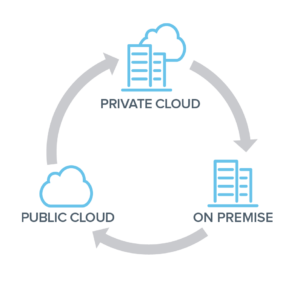
  A hybrid cloud environment integrates private, on-premise infrastructure with public cloud services, allowing data and applications to move between the two environments. This approach provides the flexibility to run workloads in the most appropriate location based on cost, performance, and security requirements.  

Benefits of a Hybrid Cloud Environment

1. Cost Savings
  • Optimized Resource Allocation: Utilize on-premise resources for steady-state workloads and high-cost operations like GPU-intensive tasks, while leveraging the cloud for variable workloads and peak demand.
  • Reduced Cloud Spending: Mitigate escalating cloud expenses by strategically deploying resources on-premise where it is more cost-effective.
  2. Scalability and Flexibility
  • Elastic Scaling: Seamlessly scale out to the cloud during peak times or for specific workloads that require additional resources.
  • Flexible Workload Management: Easily move workloads between on-premise and cloud environments based on current needs and cost considerations.
  3. Enhanced Control and Security
  • Data Sovereignty: Keep sensitive data on-premise to comply with regulatory requirements and enhance security.
  • Custom Security Measures: Implement tailored security measures on-premise while benefiting from robust cloud security for less sensitive data.
 

Implementing a Hybrid Cloud Environment: Key Considerations

1. Assess Workload Requirements Evaluate your applications to determine which workloads are best suited for on-premise infrastructure versus the cloud. Consider factors such as:
  • Resource Intensity: Identify CPU/GPU-intensive workloads that could incur high cloud costs.
  • Data Sensitivity: Determine which data sets require stringent security and compliance measures.
  Example: A financial services company might keep sensitive transaction processing on-premise while using the cloud for customer analytics and marketing campaigns.   2. Optimize On-Premise Infrastructure Invest in modernizing your on-premise infrastructure to ensure it can efficiently handle the workloads you plan to run locally. This includes:
  • Upgrading Hardware: Ensure you have the necessary compute, storage, and networking capabilities.
  • Implementing Virtualization: Use virtualization technologies to improve resource utilization and management.
  Example: A video rendering company could invest in high-performance GPUs and storage solutions on-premise to handle rendering tasks while utilizing the cloud for project management and collaboration tools.   3. Leverage Cloud Services Strategically Utilize cloud services for workloads that benefit most from the cloud's scalability and advanced features, such as:
  • Burst Capacity: Handle sudden spikes in demand without over-provisioning on-premise resources.
  • Advanced Analytics: Access cloud-based AI and machine learning services to analyze large data sets.
  Example: An e-commerce platform might use the cloud to handle traffic surges during holiday seasons and deploy AI-driven recommendation engines for personalized shopping experiences.    4. Implement Robust Management and Monitoring Tools Deploy tools that provide visibility and control over both on-premise and cloud environments. This ensures efficient resource utilization and cost management.
  • Unified Management Platforms: Use platforms like VMware Cloud Foundation or Microsoft Azure Arc to manage hybrid environments seamlessly.
  • Monitoring and Analytics: Implement monitoring tools to track performance, usage, and costs across both environments.
  Example: A manufacturing firm could use a unified management platform to monitor production workloads on-premise while tracking supply chain analytics in the cloud.   5. Ensure Seamless Integration and Interoperability Ensure that your on-premise and cloud environments can work together seamlessly. This involves: - Hybrid Cloud Architecture: Design your IT architecture to support hybrid deployments, including network connectivity and data integration. - APIs and Middleware: Use APIs and middleware solutions to facilitate communication between on-premise and cloud-based applications.   Example: A healthcare provider might integrate on-premise electronic health record (EHR) systems with cloud-based patient engagement platforms to provide a cohesive patient experience.  

Practical Examples of Hybrid Cloud Implementations

  1. Media and Entertainment Scenario: A film production company needs significant GPU resources for rendering but only during post-production phases.   Hybrid Solution: The company invests in high-performance GPU servers on-premise for rendering tasks while using the cloud for collaboration and file sharing among global teams.   2. Retail Scenario: An online retailer experiences high variability in web traffic, especially during sales events.   Hybrid Solution: The retailer runs the core e-commerce platform on-premise to ensure performance and cost predictability. During peak times, it scales out to the cloud to handle additional traffic and uses cloud-based AI services for customer insights and targeted marketing.   3. Healthcare Scenario: A hospital needs to maintain strict control over patient data but also wants to leverage cloud-based analytics for operational efficiency.   Hybrid Solution: The hospital keeps patient records and critical applications on-premise to comply with data protection regulations. It uses cloud services for non-sensitive data analytics, such as resource management and operational efficiencies.       Conclusion   A hybrid cloud environment offers the best of both worlds: the control and cost savings of on-premise infrastructure combined with the flexibility and scalability of cloud services. By carefully assessing workload requirements, optimizing on-premise resources, strategically leveraging cloud services, implementing robust management tools, and ensuring seamless integration, businesses can achieve a balanced, efficient, and cost-effective IT strategy.   Embracing a hybrid cloud approach allows businesses to adapt to changing demands, manage costs effectively, and maintain control over critical data and applications. As cloud technology continues to evolve, the hybrid model provides a pragmatic and forward-thinking solution to the complexities of modern business IT needs.
Read More
Best Practices for Network Wiring: Implementing Multi-Layer Concepts for Optimal Performance
Productivity

Best Practices for Network Wiring: Implementing Multi-Layer Concepts for Optimal Performance

Introduction:

Effective network wiring is essential for ensuring reliable connectivity, optimal performance, and scalability in small to medium-sized businesses (SMBs). By adhering to best practices and leveraging multi-layer concepts suggested by CISCO, organizations can design and implement structured cabling solutions that support their current needs while accommodating future growth. In this article, we'll explore the fundamentals of network wiring, the concepts of layers 1, 2, and 3, as well as multi-layer switches. We'll also provide detailed guidance on implementing best practices for network wiring, accompanied by network diagram references for better understanding.          

Understanding Layers 1, 2, and 3:

     1.  Layer 1 (Physical Layer):
  • The Physical Layer encompasses the physical components of a network, including cables, connectors, switches, and network interface cards (NICs).
  • Its primary function is to establish and maintain the physical connection between devices, ensuring reliable transmission of data signals.
  • Examples of Layer 1 devices include Ethernet cables, fiber-optic cables, patch panels, and network switches.
        2. Layer 2 (Data Link Layer):
  • The Data Link Layer is responsible for the reliable transfer of data between adjacent network nodes over a physical link.
  • It provides error detection, flow control, and framing of data packets, ensuring efficient and error-free communication between devices.
  • Examples of Layer 2 devices include switches, bridges, and network interface cards (NICs).
        3. Layer 3 (Network Layer):
  • The Network Layer facilitates end-to-end communication between devices across different networks by routing data packets based on IP addresses.
  • It enables logical addressing, packet forwarding, and routing decisions, allowing devices to communicate across interconnected networks.
  • Examples of Layer 3 devices include routers, Layer 3 switches, and IP-enabled devices such as computers and servers.
 

Understanding Multi-Layer Switches:

  • Multi-layer switches combine the functions of Layer 2 switching and Layer 3 routing within a single device, offering enhanced flexibility and performance for network communication.
  • They can make forwarding decisions based on both MAC addresses (Layer 2) and IP addresses (Layer 3), allowing for efficient packet switching and routing within the same network infrastructure.
  • Multi-layer switches are often used in enterprise networks to optimize traffic flow, improve network performance, and support advanced features such as VLANs, QoS, and inter-VLAN routing.
 

Best Practices for Network Wiring:

     1. Plan and Design:
  • Conduct a thorough assessment of current and future networking requirements, including device placement, bandwidth needs, and growth projections.
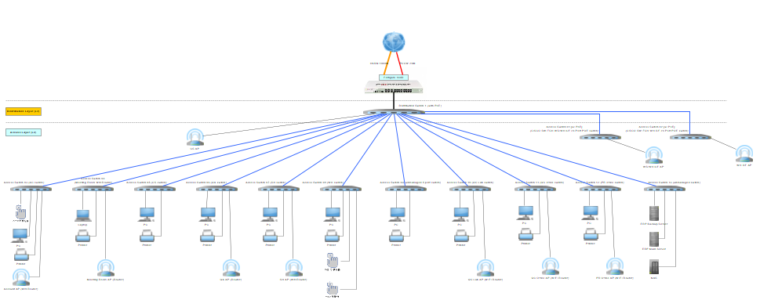
  • Create a detailed network topology diagram to visualize the layout of network components, including switches, routers, servers, and end-user devices.
      2. Use Quality Cabling:
  • Invest in high-quality Ethernet or fiber-optic cables that meet industry standards for performance and durability.
  • Choose the appropriate cable type (e.g., Cat6, Cat6a, fiber) based on factors such as distance, bandwidth requirements, and environmental conditions.
      3. Organize and Label:
  • Implement structured cabling solutions to organize cables neatly and minimize clutter, reducing the risk of cable damage and signal interference.
  • Label cables, patch panels, and network ports clearly to facilitate troubleshooting, maintenance, and future expansion.
      4. Implement Redundancy:
  • Deploy redundant network links and devices to ensure high availability and fault tolerance in case of link failures or equipment malfunctions.
  • Use technologies such as link aggregation (e.g., EtherChannel) and spanning tree protocol (STP) to provide redundancy and load balancing across network paths.
         5. Separate Data and Voice Traffic:
  • Keep data and voice traffic on separate VLANs or physical networks to prevent interference and prioritize critical communication streams.
  • Implement quality of service (QoS) policies to prioritize voice traffic and ensure low latency and high call quality for VoIP applications.
       6. Secure Access Points:
  • Secure network access points and distribution areas to prevent unauthorized access or tampering with network equipment.
  • Use locking cabinets or enclosures to protect network switches, patch panels, and other infrastructure components from physical tampering or theft.
     

Conclusion:

 By following best practices for network wiring and implementing multi-layer concepts suggested by CISCO, SMBs can build robust, scalable, and efficient network infrastructures that meet their current needs and future growth objectives. By investing in quality cabling, organizing and labeling network components, implementing redundancy and security measures, and leveraging multi-layer switches, organizations can ensure reliable connectivity, optimal performance, and seamless communication across their networks. Through careful planning, design, and implementation, SMBs can create a solid foundation for their digital infrastructure that supports their business operations and facilitates growth and innovation.  
Read More
Empowering Students: Free and Open-Source Software for Learning and Academic Success
Productivity

Empowering Students: Free and Open-Source Software for Learning and Academic Success

Introduction:

In today's digital age, access to technology and software tools is essential for academic success. However, many students, especially those from low-income backgrounds, face barriers to accessing expensive software programs. In this article, we'll explore a list of free and open-source software options that are suitable for students in Hong Kong, empowering them to excel in their studies without financial constraints. Additionally, we'll highlight the importance of leveraging donated laptops and provide tips for minimizing internet expenses.  

  Archsolution Limited

1. Libre Office:

  • Description: LibreOffice is a powerful open-source office suite that includes word processing, spreadsheet, presentation, and drawing applications.
  • Benefits: Students can create and edit documents, presentations, and spreadsheets without the need for expensive software like Microsoft Office.
  • Download Link: [LibreOffice](https://www.libreoffice.org/download/download/)
 

2. GIMP (GNU Image Manipulation Program):

  • Description: GIMP is a free and open-source image editing software that provides tools for photo retouching, graphic design, and digital painting.
  • Benefits: Students can enhance their creativity and visual projects by editing and manipulating images using professional-grade tools.
  • Download Link: [GIMP](https://www.gimp.org/downloads/)
 

3. Audacity:

  • Description: Audacity is a free and open-source audio editing software that allows users to record, edit, and mix audio files.
  • Benefits: Students can create podcasts, audio presentations, and music projects, enhancing their multimedia skills and communication abilities.
  • Download Link: [Audacity](https://www.audacityteam.org/download/)
 

4. Blender:

  • Description: Blender is a free and open-source 3D creation suite that includes modeling, animation, rendering, and compositing tools.
  • Benefits: Students interested in animation, game design, or visual effects can explore 3D modeling and animation techniques using Blender's extensive feature set.
  • Download Link: [Blender](https://www.blender.org/download/)
 

5. Moodle:

  • Description: Moodle is a free and open-source learning management system (LMS) that provides educators with tools for creating online courses, quizzes, and assignments.
  • Benefits: Teachers can use Moodle to deliver course content, track student progress, and facilitate online learning activities, enhancing students' access to educational resources.
  • Download Link: [Moodle](https://download.moodle.org/)
   

Tips for Getting a Cheap / Free PC in Hong Kong

Unfortunately, some students from the grassroot families may not able to afford to have a desktop or laptop.  There are different donation plans in Hong Kong but there is only 1 Non-profit having a regular plan.  Please see the URL below. https://ccw.caritas.org.hk/en/individual.html The above service is managed by the Caritas Youth and Community Service.  

Tips for Minimizing Internet Expenses:

Also, the internet expense should be possibly another burden for the grassroot families.  There are a number of suggestions to minimize the usage:
  • Take advantage of free Wi-Fi hotspots available in public places such as libraries, community centers, and cafes.
  • Consider subscribing to low-cost or subsidized internet plans offered by government or non-profit organizations.
  • Use mobile data sparingly and enable data-saving features on smartphones to minimize usage.
  • Explore options for sharing internet costs with family members, neighbors, or classmates through group subscriptions or sharing arrangements.
 

Conclusion:

Access to technology and software should not be a barrier to academic success for students in Hong Kong. By leveraging free and open-source software tools, coupled with donated laptops and cost-saving strategies for internet access, students can overcome financial constraints and excel in their studies. Empowering students with access to these resources not only enhances their learning experience but also promotes digital literacy and equity in education.        
Read More
A Roadmap to Digital Transformation: Enhancing Productivity and Reducing Wastage in OEM Garment Manufacturing
Productivity

A Roadmap to Digital Transformation: Enhancing Productivity and Reducing Wastage in OEM Garment Manufacturing

In the fast-paced and competitive landscape of garment manufacturing, embracing digital transformation is crucial for traditional original equipment manufacturer (OEM) garment factories to remain agile, efficient, and sustainable. By leveraging digital technologies and data-driven insights, OEM garment factories can streamline production processes, optimize resource utilization, and minimize wastage, ultimately boosting productivity and enhancing competitiveness. In this comprehensive guide, we'll outline a detailed roadmap for implementing digital transformation in an OEM garment factory to achieve these objectives, accompanied by relevant examples and best practices.            
Important Notes: Even this article is sharing use-cases in Garment Factory, but it is still valuable for all manufacturing firms.
 

1. Assessment and Strategy Development:

  • The first step in embarking on a digital transformation journey is to conduct a comprehensive assessment of the factory's current operations, capabilities, and pain points. This assessment should involve gathering input from key stakeholders across different departments to identify areas for improvement and prioritize strategic objectives. Based on the assessment findings, the factory can develop a clear digital transformation strategy aligned with its business goals and objectives.
  • Example: a traditional OEM garment factory, conducts a thorough assessment of its production processes and identifies inefficiencies in material sourcing, production planning, and inventory management. Based on these findings, the factory develops a digital transformation strategy focused on implementing advanced planning and scheduling systems, adopting RFID technology for inventory tracking, and integrating data analytics for demand forecasting.
 

2. Investment in Digital Infrastructure:

  • Building a robust digital infrastructure is essential for enabling the adoption of digital technologies and supporting data-driven decision-making. This may involve upgrading IT systems, investing in cloud computing platforms, and deploying sensors and IoT devices to collect real-time data from manufacturing equipment and processes. Additionally, the factory should prioritize cybersecurity measures to protect sensitive data and ensure operational continuity.
  • Example: A Garment Firm invests in upgrading its legacy IT systems to a cloud-based ERP (Enterprise Resource Planning) solution that integrates seamlessly with its manufacturing equipment and enables real-time data exchange. Additionally, the firm deploys IoT sensors on its production lines to monitor machine performance and collect data on production output and quality metrics.
 

3. Implementation of Advanced Planning and Scheduling (APS) Systems:

  • Advanced Planning and Scheduling (APS) systems use algorithms and optimization techniques to optimize production schedules, allocate resources efficiently, and minimize lead times. By implementing APS systems, OEM garment factories can improve production planning accuracy, reduce idle time, and enhance overall operational efficiency.
  • Example: A Garment factory adopts an APS system that integrates with its ERP software to automate production scheduling and resource allocation based on demand forecasts, production capacity, and inventory levels. As a result, the factory achieves a significant reduction in lead times and inventory holding costs while improving on-time delivery performance.
 

4. Adoption of RFID Technology for Inventory Management:

  • Radio Frequency Identification (RFID) technology enables real-time tracking and monitoring of inventory throughout the supply chain, from raw materials to finished products. By implementing RFID systems, OEM garment factories can improve inventory visibility, reduce stockouts and overstocking, and enhance order fulfillment efficiency.
  • Example: A large scale Garment manufacturing company deploys RFID tags on its raw materials, work-in-progress (WIP) inventory, and finished goods, allowing for seamless tracking and monitoring throughout the production process. The company integrates RFID data with its ERP system to optimize inventory levels, identify bottlenecks, and improve production planning accuracy.
 

5. Integration of Data Analytics for Demand Forecasting:

  • Data analytics tools and techniques can provide valuable insights into customer preferences, market trends, and demand patterns. By analyzing historical sales data, market trends, and customer feedback, OEM garment factories can develop more accurate demand forecasts, optimize production planning, and reduce the risk of overproduction or stockouts.
  • Example: A garment factory leverages data analytics to analyze historical sales data, social media trends, and customer feedback to identify emerging fashion trends and forecast demand for its products. The factory uses predictive analytics models to generate demand forecasts for different product categories and sizes, enabling more accurate production planning and inventory management.
 

6. Implementation of Lean Manufacturing Principles:

  • Lean manufacturing principles, such as Just-in-Time (JIT) production, Kanban systems, and continuous improvement initiatives, are essential for reducing waste, improving efficiency, and optimizing resource utilization in garment manufacturing. By embracing lean principles, OEM garment factories can minimize lead times, reduce excess inventory, and enhance overall operational agility.
  • Example: A large garment manufacturing firm adopts lean manufacturing principles and implements Kanban systems to optimize material flow and production processes. The company establishes visual management systems on the factory floor to monitor production progress, identify bottlenecks, and empower employees to identify and address inefficiencies in real time.
 

7. Employee Training and Change Management:

  • Digital transformation requires a cultural shift and ongoing employee training to ensure successful adoption and implementation of new technologies and processes. OEM garment factories should invest in comprehensive training programs to upskill employees, foster a culture of innovation, and promote continuous learning and improvement.
  • Example: A garment factory provides extensive training to its workforce on the use of new digital tools and technologies, such as ERP systems, APS software, and RFID technology. The factory also establishes cross-functional teams to drive digital transformation initiatives and encourages employee participation in process improvement projects.
 

8. Continuous Monitoring and Improvement:

  • Digital transformation is an ongoing process that requires continuous monitoring, evaluation, and adaptation to changing market dynamics and technological advancements. OEM garment factories should establish key performance indicators (KPIs) to track progress, identify areas for improvement, and iterate on digital transformation initiatives to drive sustainable growth and competitiveness.
  • Example: A Hong Kong based Garment company establishes a digital transformation steering committee tasked with monitoring KPIs, conducting regular performance reviews, and identifying opportunities for process optimization and innovation. The company also solicits feedback from employees and stakeholders to identify pain points and areas for improvement, fostering a culture of continuous improvement and innovation.
 

Remark: all garment factory use-cases needed to be anonymous due to NDA agreement.

  In conclusion, implementing digital transformation initiatives is essential for OEM garment factories to enhance productivity, reduce wastage, and remain competitive in today's rapidly evolving market. By adopting a strategic approach to digital transformation, leveraging advanced technologies, and embracing a culture of innovation and continuous improvement, OEM garment factories can streamline production processes, optimize resource utilization, and drive sustainable growth and profitability. By following the detailed roadmap outlined in this guide and learning from relevant examples and best practices, OEM garment factories can navigate the complexities of digital transformation successfully and realize the full potential of digital technologies to transform their operations and achieve business objectives.    
Read More
Exploring Open Source ERP Software: A Comprehensive Comparison and Use Cases
Productivity

Exploring Open Source ERP Software: A Comprehensive Comparison and Use Cases

Introduction:

  Enterprise Resource Planning (ERP) software plays a critical role in streamlining business processes, improving efficiency, and enhancing decision-making within organizations. Open source ERP solutions offer flexibility, cost-effectiveness, and the freedom to customize the software to meet specific business requirements. This article aims to provide an in-depth analysis of different popular open source ERP software, including Odoo, Metasfresh, ADempiere, Apache OFBiz, Dolibarr, Tryton, Axelor ERP, xTuple PostBooks, NetSuite, INOERP, and NextERP. We will explore their features, benefits, drawbacks, and examine industry-specific use cases for each software.    

1. Odoo:

Odoo is a widely adopted open source ERP software known for its modular approach and extensive functionality. It offers a broad range of applications, including CRM, sales, inventory management, accounting, HR, and more. Some key features of Odoo include:   Pros: - Comprehensive set of modules for various business functions. - Highly customizable and flexible. - Active community and continuous updates. - User-friendly interface and intuitive navigation. - Integration capabilities with third-party applications.   Cons: - Steep learning curve for customization and advanced configurations. - Limited support options for the community edition. - Performance issues with large databases.   Use Cases: - Manufacturing: Odoo provides modules for managing manufacturing processes, including bill of materials, work orders, quality control, and product lifecycle management. - E-commerce: Odoo offers e-commerce functionality, enabling businesses to create online stores, manage product catalogs, handle sales orders, and integrate payment gateways.    

2. Metasfresh:

Metasfresh is an open source ERP solution focused on providing a comprehensive suite of modules for small to medium-sized enterprises. It offers features such as procurement, inventory management, sales, accounting, and production planning.   Pros: - Rich functionality tailored for small and medium-sized businesses. - Modern and intuitive user interface. - Active community support and regular updates. - Multilingual and multi-currency support. - Integration capabilities with other systems.   Cons: - Limited scalability for larger enterprises. - Advanced customization may require technical expertise. - Documentation and user guides can be improved.   Use Cases: - Retail: Metasfresh can be utilized by retail businesses for managing inventory, sales, and customer relationships. It enables streamlined operations and improved stock management. - Wholesale Distribution: Metasfresh's modules for procurement, sales, and distribution make it suitable for wholesale distributors seeking efficient inventory management and order processing.    

3. ADempiere:

ADempiere is an open source ERP and CRM solution designed for medium to large-sized enterprises. It offers a comprehensive suite of modules for finance, manufacturing, procurement, sales, and more.   Pros: - Flexible architecture allowing customization and extension. - Strong financial management capabilities. - Robust reporting and analytics features. - Active community and regular updates. - Scalable for larger organizations.   Cons: - Steep learning curve for initial setup and configuration. - Limited user-friendly interface and outdated design. - Requires technical expertise for advanced customization.   Use Cases: - Distribution: ADempiere's capabilities in inventory management, procurement, and sales make it suitable for distribution companies managing multiple warehouses and complex supply chains. - Service-based Industries: ADempiere's CRM functionality and service management modules can benefit service-based industries by streamlining customer interactions, managing service contracts, and tracking service requests.    

4. Apache OFBiz:

Apache OFBiz is an open source ERP solution known for its flexibility and modular architecture. It offers features for order management, inventory management, accounting, CRM, and more.   Pros: - Highly customizable and adaptable to specific business requirements. - Scalable for small to large enterprises. - Robust e-commerce capabilities. - Active community and regular updates. - Integration with other Apache projects.   Cons: - Steep learning curve for initial setup and configuration. - User interface can be improved for better usability. - Limited documentation and learning resources.   Use Cases: - E-commerce: Apache OFBiz provides extensive e-commerce features, including catalog management, shopping cart functionality, payment integration, and order processing, making it suitable for online retail businesses. - Supply Chain Management: The inventory management and order management capabilities of Apache OFBiz make it ideal for organizations involved in supply chain management, enabling streamlined operations and improved visibility.    

5. Dolibarr:

Dolibarr is a lightweight and user-friendly open source ERP and CRM solution. It offers modules for invoicing, accounting, project management, inventory management, and more.   Pros: - Simple and intuitive user interface. - Easy installation and setup process. - Modular structure for customization and extension. - Active community and regular updates. - Mobile-friendly interface for remote access.   Cons: - Limited scalability for larger enterprises. - Advanced features may require additional modules or customization. - Limited reporting and analytics capabilities.   Use Cases: - Freelancers and Small Businesses: Dolibarr's simplicity and ease of use make it suitable for freelancers and small businesses seeking basic ERP and CRM functionality to manage their operations, finances, and customer relationships.    

6. Tryton:

Tryton is a highly flexible and scalable open source ERP solution known for its modularity and customization capabilities. It offers features for accounting, inventory management, procurement, sales, and more.   Pros: - Modular architecture allowing customization and extension. - Scalable for small to large enterprises. - Strong financial management capabilities. - Active community and regular updates. - Multi-language and multi-currency support.   Cons: - Steep learning curve for customization and configuration. - User interface can be improved for better usability. - Limited documentation and learning resources.   Use Cases: - Manufacturing: Tryton's modules for manufacturing management, bill of materials, and work orders make it suitable for manufacturing companies seeking a flexible and customizable ERP solution to streamline their operations. - Project-based Organizations: Tryton's project management features, including resource allocation, task management, and time tracking, can benefit project-based organizations in effectively managing their projects and resources.    

7. Axelor ERP:

Axelor ERP is a comprehensive open source ERP software designed for small to medium-sized businesses. It offers modules for CRM, sales, procurement, project management, and more.   Pros: - All-in-one solution covering various business functions. - User-friendly and intuitive interface. - Mobile-friendly design for remote access. - Active community and regular updates. - Integration capabilities with other applications.   Cons: - Limited scalability for larger enterprises. - Advanced customization may require technical expertise. - Some modules may lack advanced features compared to other ERP solutions.   Use Cases: - Professional Services: Axelor ERP can be beneficial for professional service organizations, such as consulting firms or agencies, by providing features for project management, time tracking, invoicing, and resource allocation. - Retail and Distribution: Axelor ERP's modules for inventory management, sales, and procurement make it suitable for retail and distribution businesses seeking streamlined operations and improved inventory control.  

8. xTuple PostBooks:

xTuple PostBooks is an open source ERP solution with a focus on manufacturing and distribution businesses. It offers modules for accounting, inventory management, CRM, sales, and more.   Pros: - Specialized features for manufacturing and distribution. - Flexible and customizable architecture. - User-friendly interface and intuitive navigation. - Active community and regular updates. - Integration capabilities with other applications.   Cons: - Steep learning curve for customization and advanced configurations. - Limited scalability for larger enterprises. - Some modules may lack advanced features compared to other ERP solutions.   Use Cases: - Manufacturing: xTuple PostBooks provides comprehensive features for managing manufacturing processes, including bill of materials, work orders, scheduling, and shop floor control, making it suitable for manufacturing businesses. - Wholesale Distribution: xTuple PostBooks' inventory management, sales, and distribution modules can benefit wholesale distributors in managing their inventory, sales orders, and customer relationships.    

9. NetSuite:

NetSuite is a popular cloud-based ERP solution that offers a wide range of features for various industries and business functions. While it is not open source, it is included here due to its widespread use and notable features.   Pros: - Comprehensive suite of modules for various industries and functions. - Cloud-based solution offering scalability and accessibility. - Strong financial management capabilities. - Robust reporting and analytics features. - Integration capabilities with other systems.   Cons: - Higher cost compared to open source alternatives. - Limited customization options compared to open source ERP solutions. - Dependency on internet connectivity for accessibility.   Use Cases: - Retail and E-commerce: NetSuite provides features for managing inventory, order processing, financials, and customer relationships, making it suitable for retail and e-commerce businesses of various sizes. - Professional Services: NetSuite's project management, resource management, and time tracking capabilities can benefit professional service organizations in effectively managing their projects, resources, and billing.    

10. INOERP:

INOERP is an open source ERP solution designed for small and medium-sized businesses. It offers modules for finance, sales, procurement, manufacturing, and more.   Pros: - Simplified user interface for ease of use. - Easy installation and setup process. - Active community support and regular updates. - Scalable for growing businesses. - Multi-language and multi-currency support.   Cons: - Limited scalability for larger enterprises. - Advanced customization may require technical expertise. - Some modules may lack advanced features compared to other ERP solutions.   Use Cases: - Service-based Industries: INOERP's modules for service management, customer relationship management, and billing can benefit service-based industries in managing their service requests, contracts, and customer relationships. - Small and Medium-sized Enterprises: INOERP's ease of use and modular structure make it suitable for small and medium-sized enterprises seeking a cost-effective and customizable ERP solution.    

11. NextERP:

  NextERP is an open source ERP software designed for small and medium-sized businesses. It offers modules for sales, procurement, inventory management, accounting, and more.   Pros: - Simple and user-friendly interface. - Easy installation and setup process. - Active community support and regular updates. - Multilingual and multi-currency support. - Integration capabilities with other applications.   Cons: - Limited scalability for larger enterprises. - Advanced customization may require technical expertise. - Some modules may lack advanced features compared to other ERP solutions.   Use Cases: - Retail and Wholesale: NextERP's modules for sales, procurement, and inventory management make it suitable for retail and wholesale businesses seeking streamlined operations and improved inventory control. - Service-based Industries: NextERP's service management features, including service requests, contracts, and billing, can benefit service-based industries in managing their customer interactions and service operations.    

Conclusion:

Open source ERP software offers a range of benefits, including cost-effectiveness, flexibility, and customization options. In this article, we explored and compared popular open source ERP solutions, including Odoo, Metasfresh, ADempiere, Apache OFBiz, Dolibarr, Tryton, Axelor ERP, xTuple PostBooks, NetSuite, INOERP, and NextERP. Each software has its strengths and weaknesses, making them suitable for different industries and business sizes. By understanding their features, pros, cons, and industry-specific use cases, businesses can make informed decisions about selecting the right open source ERP software that aligns with their requirements and supports their growth and success.    

Read More
Unleashing the Power of Wi-Fi 6: A Comprehensive Introduction and Benefits
Productivity

Unleashing the Power of Wi-Fi 6: A Comprehensive Introduction and Benefits

Introduction:

In today's interconnected world, Wi-Fi has become an essential technology that enables seamless wireless connectivity for a wide range of devices, from smartphones and laptops to smart home devices and IoT devices. The evolution of Wi-Fi standards has brought significant improvements in terms of speed, capacity, and reliability. One of the latest advancements in this field is Wi-Fi 6, the sixth generation of Wi-Fi technology. This article aims to provide a comprehensive introduction to Wi-Fi and highlight the key differences and benefits of Wi-Fi 6 compared to its previous versions.            

Understanding Wi-Fi:

Wi-Fi, short for "Wireless Fidelity," is a wireless networking technology that allows devices to connect to the internet or communicate with each other without the need for physical cables. Wi-Fi operates on radio frequencies, enabling data transmission through the airwaves. It has revolutionized the way we access information, communicate, and interact with digital services.  

Previous Wi-Fi Versions:

Over the years, Wi-Fi technology has evolved with the introduction of various standards, each offering improvements in terms of speed, range, and reliability. The previous Wi-Fi versions include:   1. Wi-Fi 1 (802.11b): This was the first commercially available Wi-Fi standard, offering data rates of up to 11 Mbps. It operated in the 2.4 GHz frequency band and provided limited range.   2. Wi-Fi 2 (802.11a/g): Wi-Fi 2 improved upon the previous version by offering higher data rates up to 54 Mbps. It introduced the 5 GHz frequency band, providing better performance and reducing interference.   3. Wi-Fi 3 (802.11n): Wi-Fi 3 brought significant enhancements in speed and range. It supported multiple-input and multiple-output (MIMO) technology, enabling better data throughput and improved reliability.Wi-Fi 3 devices operated in both the 2.4 GHz and 5 GHz bands.   4. Wi-Fi 4 (802.11ac): Wi-Fi 4 was a major leap forward, introducing higher speeds and increased capacity. It operated exclusively in the 5 GHz frequency band and offered data rates of up  to several gigabits per second (Gbps). Wi-Fi 4 devices supported beamforming technology for better coverage and reduced interference.    

Introducing Wi-Fi 6:

Wi-Fi 6, also known as 802.11ax, is the latest generation of Wi-Fi technology, designed to address the growing demands of modern wireless networks. It brings several key improvements that make it worth considering for businesses and consumers alike.   1.Increased Speed and Capacity: Wi-Fi 6 offers significantly higher data rates, reaching up to 10 Gbps. This increased speed allows for faster downloads, smoother streaming, and improved overall network performance. Furthermore, Wi-Fi 6 incorporates multi-user multiple-input multiple-output (MU-MIMO) technology, enabling simultaneous data transmission to multiple devices, thereby increasing network capacity and reducing latency.   2. Enhanced Efficiency: One of the notable features of Wi-Fi 6 is Orthogonal Frequency Division Multiple Access (OFDMA), which enables more efficient utilization of available bandwidth. With OFDMA, Wi-Fi 6 divides each channel into smaller sub-channels, allowing multiple devices to transmit data simultaneously. This technology improves network efficiency, especially in environments with multiple connected devices, such as homes, offices, and public spaces.   3. Better Range and Coverage: Wi-Fi 6 employs advanced beamforming techniques, known as Target Wake Time (TWT), to optimize signal transmission and reception. This technology enables devices to schedule their communication with the router, reducing power consumption and improving battery life. Additionally, Wi-Fi 6 introduces improved modulation schemes, allowing for better signal penetration through walls and other obstacles, resulting in enhanced range and coverage.   4. Lower Latency: With the introduction of technologies like OFDMA and MU-MIMO, Wi-Fi 6 significantly reduces latency. This is especially beneficial for applications that require real-time responsiveness, such as online gaming, video conferencing, and IoT devices.    

Why Invest in Wi-Fi 6 Devices:

Upgrading to Wi-Fi 6 devices, such as access points or routers, offers several compelling benefits:   1.  Future-Proofing: Wi-Fi 6 is the latest industry standard, and investing in compatible devices ensures that your network infrastructure is ready to support future technologies and advancements.   2. Improved Performance: Wi-Fi 6 devices provide faster speeds, higher capacity, and better overall performance, enabling smooth and uninterrupted connectivity for bandwidth-intensive tasks and multiple connected devices.   3. Enhanced User Experience: With reduced latency and improved efficiency, Wi-Fi 6 devices deliver a superior user experience, ensuring seamless streaming, faster downloads, and lag-free online gaming.   4. Increased Device Density: Wi-Fi 6's ability to handle a larger number of connected devices simultaneously makes it ideal for environments with numerous smart devices, such as smart homes, offices, and public venues.   5. Security Enhancements: Wi-Fi 6 includes the latest security protocols and encryption standards, providing better protection against potential security threats and ensuring the privacy and integrity of your  network.    

Conclusion:

  Wi-Fi has revolutionized the way we connect and communicate in the digital era. Wi-Fi 6 represents a significant leap forward in terms of speed, capacity, and efficiency. With its increased performance, enhanced user experience, and support for emerging technologies, Wi-Fi 6 is a worthwhile investment for individuals, businesses, and organizations looking to stay ahead in the rapidly evolving digital landscape. By upgrading to Wi-Fi 6 devices like access points or routers, users can unlock the full potential of their wireless networks and enjoy a seamless, fast, and reliable connectivity experience.    

Read More
Comparing AliCloud, TencentCloud, and HuaweiCloud: A Comprehensive Analysis
Productivity

Comparing AliCloud, TencentCloud, and HuaweiCloud: A Comprehensive Analysis

Introduction

As cloud computing continues to shape the digital landscape, businesses are increasingly adopting cloud services to enhance their operations. This article aims to provide a detailed comparison of three prominent cloud service providers: AliCloud (Alibaba Cloud), TencentCloud, and HuaweiCloud. We will analyze various aspects, including features, services, performance, security, and pricing, to help businesses make an informed decision when selecting a cloud service provider.
  1. Features and Services:

  • AliCloud: AliCloud offers a wide range of services, including Elastic Compute Service (ECS), Object Storage Service (OSS), Relational Database Service (RDS), and Data Analytics. It also provides AI and Big Data services, such as Machine Learning Platform for AI and MaxCompute, enabling advanced analytics and intelligent applications.
  • TencentCloud: TencentCloud provides services like Cloud Virtual Machine (CVM), Cloud Object Storage (COS), and TencentDB. It offers AI capabilities through services like Tencent Machine Learning Platform and facial recognition solutions. TencentCloud also emphasizes its integration with Tencent's other offerings, such as WeChat and QQ.
  • HuaweiCloud: HuaweiCloud provides services such as Elastic Cloud Server (ECS), Object Storage Service (OBS), and Relational Database Service (RDS). It focuses on emerging technologies like AI and IoT, offering services like ModelArts and HiLens for AI development and IoT device management.
  1. Performance and Scalability:

  • AliCloud: AliCloud boasts a vast global network of data centers, ensuring low latency and high availability. It provides elastic scaling options, enabling businesses to scale resources up or down based on demand. AliCloud also offers Content Delivery Network (CDN) services for faster content delivery.
  • TencentCloud: TencentCloud operates data centers worldwide and leverages Tencent's extensive network infrastructure. It provides Auto Scaling capabilities to adjust resources dynamically. TencentCloud emphasizes its ability to handle high-traffic scenarios, such as live streaming and gaming.
  • HuaweiCloud: HuaweiCloud offers high-performance servers and leverages Huawei's global network infrastructure for low-latency connections. It provides Elastic Load Balance (ELB) and Auto Scaling features to ensure scalability. HuaweiCloud also emphasizes its capabilities for AI and high-performance computing workloads.
  1. Security and Compliance:

  • AliCloud: AliCloud emphasizes security and compliance, offering features like Elastic Firewall, Anti-DDoS protection, and Security Center for threat detection and compliance management. It complies with international standards such as ISO 27001 and GDPR, ensuring data security and privacy.
  • TencentCloud: TencentCloud provides robust security measures, including Anti-DDoS, Web Application Firewall (WAF), and Cloud Access Security Broker (CASB). It complies with various security certifications, including ISO 27001 and CSA Star Certification.
  • HuaweiCloud: HuaweiCloud prioritizes security and compliance, providing features like Anti-DDoS, Web Application Firewall (WAF), and Virtual Private Cloud (VPC) for secure network isolation. It complies with international standards such as ISO 27001 and CSA Star Certification.
  1. Pricing and Cost:

  • AliCloud: AliCloud offers a flexible pricing model, including pay-as-you-go and subscription options. It provides cost-saving options like Reserved Instances and spot instances. AliCloud also offers pricing calculators and cost management tools to optimize costs.
  • TencentCloud: TencentCloud follows a similar pricing model, including pay-as-you-go and subscription options. It provides cost-saving measures like Reserved Instances and spot instances. TencentCloud also offers cost management tools to monitor and optimize expenses.
  • HuaweiCloud: HuaweiCloud offers competitive pricing with pay-as-you-go and subscription options. It provides cost-saving options like Elastic Volume Service (EVS) and Reserved Instances. HuaweiCloud also offers a pricing calculator and cost management tools for cost optimization.

Conclusion:

Choosing the right cloud service provider is a critical decision for businesses seeking to leverage the power of cloud computing. AliCloud, TencentCloud, and HuaweiCloud offer a wide range of features and services, with each provider having its strengths in different areas. When making a choice, businesses should consider factors such as specific service requirements, performance needs, security and compliance considerations, and cost optimization strategies. By evaluating these aspects, organizations can select the cloud service provider that best aligns with their business goals and IT infrastructure requirements.
Read More
Computer Lab & Private Cloud 2.0
Productivity

Computer Lab & Private Cloud 2.0

In our new office, there is an upgrade on our private cloud 2.0. This is our commitment to our clients with continuous development for our technical team. We are providing the best cybersecurity, network and IT infrastructure services, etc. Supermicro Xeon Server Archsolution Design Open Frame Rack with Supermicro Servers Meanwhile, we would like to share our new computer lab 2.0 using our tailored racks for hosting servers.  Our own design 25U open frame #rack is #adjustable and able to support #400KG.  It is a rack able to be installed or uninstalled within 45 minutes. So, it is fit for temporary projects or even home-use.    
Read More
IT Infrastructure Tips for Small Business #1 (Communication Tools)
Productivity

IT Infrastructure Tips for Small Business #1 (Communication Tools)

There are a number of articles being written for small businesses and will be published. During the Coronavirus crisis since 2020, there are lots of people working at home remotely.  In the first article, it is going to discuss communication tools for remote work.   WhatsApp / WeChat, etc. are not classified as communication tools for work and not to be discussed in this article.  However, there are still lots of tools needed to be in-place like Remote Access, Sharing of document, etc.  We will discuss them later in other articles with tips. There are many software able to do video conferencing with both freemium and paid software.  It is important for this type of software with features below:
  • Screen Sharing
  • File Sharing
  • WebCam Connection
  • Computer Audio Connection (Mic+Speaker/ Headset)
  • Options for toll-free diag-in
  • Options for recording
We would like to introduce some of the choices as below: 1. Google Hangouts Let’s start with freemium first.  This is again a free tool provided by the giant – Google.  You can just type Google hangouts at google search.  On the left hand side, you will see your contact list at the left hand side.  Then, you can invite anyone to join the call. 2. Zoom Zoom is now the most popular conference call or even webinar services in the world.  You can use Zoom free under some limitations like 40 minutes for multiple participants.  However, you can also pick paid services with options to provide toll free calls across 100 countries with a lower price than WebEx. Unfortunately, more users found that it is possible to expose the meeting to strangers without setting the security carefully.  Also, Zoom had shared the meeting information with servers located in China.  It is very sensitive for information leakage due to the American Chinese founder.  In APR 2020 (latest update), they have fixed their security issues. 3. WebEx For me, it is still the number one in the market with its stability and security.  However, it is still one of the most expensive one.  For user outside UK or US, the price is extremely high for those corporations seeking with toll-free support. Furthermore, Cisco WebEx is the pioneer for providing video conference solutions with the best security.  So, it is better for businesses with higher budget. 4. Jitsi Meet This is an Open Source solution.  You can use their service freely at https://meet.jit.si with starting a meeting room.  Even anyone could start a meeting, but you can have your own password for the target participants to reach the unique meeting room for privacy & protection. Also, you can have a choice to host the Jitsi at your own server and add security protection like authorized account to start a meeting.  As many other open source solution, it is possible to integrate your own LDAP server for installation on-premises.  We can help you or your organization to set up Jitsi-meet server with a very low charge. 5. Microsoft Teams If you are using office 365, you may have Microsoft Teams to connect to your team members or making calls.  If you have Microsoft Teams available in your organization, you don’t need to shop around. It is quite easy to manage and fully integrate with Microsoft Active Directory.  For the functionalities, it is basically similar to WebEx but in a different user interface. 6. Others There are other different vendors providing similar monthly subscription plans like Zoom or Cisco including: To conclude, it is better to have a big vendor for more resources available for the underlying infrastructure being invested by the vendor.  Basically, all of these solutions could be used in PC (Windows), MAC OSX and even mobile devices.  However, Jitsi Meet is an alternative for not paying any service charges to have your own solution with internal IT resources.  For small team, it is possible to pick Google Hangouts – freemium version.
Read More
Professional Service Arrangement (30 Jan 2020)
Data Protection

Professional Service Arrangement (30 Jan 2020)

Due to the new corona virus impact and epidemic spread, we may provide remote support to our clients via: 1. Zoom 2. WebEx 3. Microsoft Team 4. Slack Please contact us via email and phone for any arrangement and / or update. Thanks. Regards, Archsolution Limited
Read More