Virtualization with Proxmox: A Cost-Effective Alternative to VMware
Productivity

Virtualization with Proxmox: A Cost-Effective Alternative to VMware

Introduction

With VMware shifting to an annual subscription model and significantly increasing virtualization costs, many organizations are looking for alternative solutions. One of the best options available today is Proxmox Virtual Environment (Proxmox VE), an open-source platform that offers stability, comprehensive features, and support for containerization technologies like Docker with LXC. In this guide, we will explore the benefits of Proxmox, how it compares to VMware, and why businesses should consider migrating to Proxmox as a cost-effective and highly capable virtualization platform.            

Why Choose Proxmox Over VMware?

1. Cost Savings VMware’s shift to an annual subscription model has driven up costs for enterprises. In contrast, Proxmox VE is open-source, with free access to its full feature set. Organizations can opt for a paid support subscription, but the overall cost remains significantly lower than VMware’s pricing model. 2. Stability and Performance Proxmox is built on Debian Linux with a stable and robust KVM (Kernel-based Virtual Machine) hypervisor. It provides:
  • High performance for virtualized workloads
  • Reliable uptime and stability
  • Efficient resource management with built-in support for advanced virtualization features like live migration and high availability clustering
3. Comprehensive Features Proxmox VE includes all essential features needed for enterprise-grade virtualization:
  • KVM and LXC support: Run both full virtual machines and lightweight containers
  • Built-in web UI: Manage virtual machines and containers easily
  • Storage support: Includes local, shared, and networked storage (NFS, Ceph, ZFS, iSCSI)
  • Backup and restore: Integrated backup system with snapshot capabilities
  • High Availability (HA): Failover and redundancy to ensure minimal downtime
4. Docker and Container Support While VMware does not natively support Docker, Proxmox offers seamless integration with LXC interface and can run Docker within virtual machines. This enables businesses to:
  • Deploy lightweight and efficient containerized applications
  • Reduce overhead compared to traditional VMs
  • Scale applications easily with container orchestration tools
5. Flexibility in Hardware and Licensing Unlike VMware, which imposes restrictions on licensing and hardware compatibility, Proxmox can run on nearly any hardware. There are no CPU or RAM restrictions, and users can scale their virtualization infrastructure without incurring additional licensing fees.  

Proxmox vs. VMware: Feature Comparison

Feature Proxmox VE VMware vSphere
Cost Free (paid support optional) Subscription-based
Hypervisor KVM (Linux-based) ESXi (Proprietary)
Container Support Docker (via VM) No native support
Storage Options ZFS, Ceph, NFS, iSCSI vSAN (additional cost)
High Availability Yes (Built-in) Yes (vSphere HA)
Backup & Restore Integrated snapshot & backup tools vSphere Data Protection (Deprecated)
Live Migration Yes (without downtime) Yes
Hardware Requirements Flexible, works with consumer hardware Strict compatibility list
 

How to Migrate from VMware to Proxmox

Migrating from VMware to Proxmox can be done in three major steps: Step 1: Assess Your Virtual Environment
  • Identify the virtual machines running on your VMware environment
  • Check hardware compatibility for Proxmox deployment
  • Determine network and storage configuration
Step 2: Install Proxmox and Configure Storage
  • Download the latest Proxmox VE ISO from the official website
  • Install it on your server hardware
  • Set up networking and ZFS or Ceph storage for optimal performance
Step 3: Convert and Migrate VMs
  • Use tools like qemu-img to convert VMware disk images to Proxmox-compatible formats
  • Create virtual machines in Proxmox and import converted disk images
  • Test and optimize VM performance post-migration
 

Backup and Disaster Recovery in Proxmox

Proxmox includes built-in backup solutions that ensure data integrity and system reliability. Some recommended backup strategies include: 1. Built-in Proxmox Backup Server
  • Supports incremental and full backups
  • Allows backup scheduling and retention policies
  • Secure and encrypted storage for VM backups
2. External Backup Solutions Organizations can also integrate third-party backup tools, such as:
  • Free Options: BorgBackup, Restic, and Duplicati for secure and efficient backups
  • Paid Options: Veeam Backup & Replication, Acronis Cyber Protect for enterprise-level disaster recovery
 

Use Cases for Proxmox Deployment

Proxmox is a versatile solution for businesses of all sizes. Some common use cases include: 1. Small and Medium Businesses (SMBs)
  • Run cost-effective virtualization with no expensive licensing
  • Deploy business-critical applications on stable and scalable infrastructure
2. Enterprises and Data Centers
  • Manage large-scale VM clusters with high availability
  • Utilize Ceph storage for distributed and redundant storage
  • Reduce VMware licensing costs by switching to Proxmox
3. Development and Testing Environments
  • Run test environments for software development without extra costs
  • Use Docker with LXC for fast application deployment
  • Experiment with AI/ML workloads on Proxmox-based GPU-enabled VMs
 

Conclusion: Why Proxmox is the Future of Virtualization

With rising VMware costs and inflexible licensing models, businesses need a reliable and cost-effective alternative. Proxmox VE provides an open-source, high-performance virtualization solution with extensive features, stability, and support for containers like Docker with LXC. By switching to Proxmox, organizations can:
  • Reduce operational costs by eliminating VMware licensing fees
  • Enhance flexibility with a hardware-agnostic virtualization platform
  • Achieve enterprise-grade performance with built-in HA, backup, and container support
As organizations seek to optimize IT infrastructure without incurring unnecessary expenses, Proxmox emerges as the best alternative to VMware. Start your transition today and take control of your virtualization future! If your company needs assistance with Proxmox deployment, contact us for expert support!  
Read More
Comprehensive Guide to Backup Best Practices for Organizations
Productivity

Comprehensive Guide to Backup Best Practices for Organizations

Introduction

Data is one of the most valuable assets for any organization. Whether an enterprise relies on on-premises servers, cloud services, or a hybrid infrastructure, having a robust backup strategy is essential for business continuity, compliance, and disaster recovery. This guide will provide best practices for backup management, covering different systems, tools, and real-world use cases.              

1. Understanding Backup Strategies

Before selecting a backup solution, organizations should understand the primary backup methodologies: 1.1 Full Backup
  • A complete copy of all data and applications.
  • Recommended for mission-critical systems but requires significant storage.
  • Use-case: Monthly full backups for compliance and historical record-keeping.
1.2 Incremental Backup
  • Only backs up changes since the last backup.
  • Faster and consumes less storage than full backups.
  • Use-case: Daily incremental backups for an ERP system to capture daily transactions.
1.3 Differential Backup
  • Captures changes since the last full backup.
  • Uses more storage than incremental backups but speeds up recovery.
  • Use-case: Weekly differential backups for HR databases to minimize recovery times.
1.4 Snapshot Backups
  • Captures the state of a system at a given time.
  • Useful for virtualized environments and database applications.
  • Use-case: Snapshots for cloud-based databases like Amazon RDS before major software updates.
 

2. Backup Best Practices for On-Premises Servers

Organizations relying on on-premises infrastructure should implement the following: 2.1 3-2-1 Backup Strategy
  • Maintain 3 copies of data (1 primary + 2 backups).
  • Store copies on 2 different media types (e.g., disk & tape).
  • Keep 1 copy offsite (e.g., cloud or another data center).
  • Use-case: A financial institution storing backups on local NAS, tape storage, and an offsite disaster recovery center.
2.2 Scheduled and Automated Backups
  • Automate backup processes to avoid human errors.
  • Tools:
    • Free: UrBackup, Amanda
    • Paid: Veeam Backup & Replication, Acronis Cyber Protect
  • Use-case: An SMB using UrBackup for daily workstation backups.
2.3 Data Encryption & Security
  • Encrypt backups to prevent unauthorized access.
  • Secure physical access to backup servers.
  • Use-case: A healthcare provider encrypting patient record backups for HIPAA compliance.
 

3. Backup Best Practices for Cloud Services

For organizations leveraging cloud services, consider the following: 3.1 Cloud Backup vs. Cloud Syncing
  • Cloud backups store point-in-time copies for recovery.
  • Cloud syncing (e.g., OneDrive, Google Drive) is not a true backup solution.
  • Use-case: A legal firm backing up case files to AWS S3 instead of relying on Google Drive sync.
3.2 Selecting the Right Cloud Backup Provider
  • Ensure compliance with industry regulations (e.g., GDPR, HIPAA).
  • Opt for providers with versioning, encryption, and disaster recovery options.
  • Tools:
    • Free: Duplicati, Restic
    • Paid: Backblaze B2, Acronis Cyber Backup, AWS Backup
  • Use-case: A retail company using Backblaze B2 for automatic backups of sales data.
3.3 Cloud Backup Scheduling & Retention Policies
  • Set up automatic backups at regular intervals.
  • Define retention policies based on business needs.
  • Use-case: A government agency retaining cloud backups for 7 years per legal mandates.
 

4. Hybrid Backup Solutions

A hybrid approach combines on-premises and cloud backups for redundancy. 4.1 Benefits of a Hybrid Approach
  • Faster recovery from local backups.
  • Cloud backups for disaster recovery and long-term storage.
  • Use-case: A SaaS company using local NAS for quick restores and Azure Blob Storage for offsite disaster recovery.
4.2 Recommended Tools
  • Free: Bacula, Duplicati
  • Paid: Veeam Cloud Connect, Acronis Hybrid Cloud Backup
 

5. Disaster Recovery Planning

Having backups is not enough—organizations need a structured disaster recovery (DR) plan. 5.1 Defining Recovery Objectives
  • RTO (Recovery Time Objective): Maximum acceptable downtime.
  • RPO (Recovery Point Objective): Maximum acceptable data loss.
  • Use-case: A bank setting RTO of 2 hours and RPO of 15 minutes for transaction databases.
5.2 Regular Backup Testing
  • Test backups periodically to ensure successful recovery.
  • Use-case: An e-commerce company conducting quarterly restore drills for its order management system.
 

6. Conclusion

Implementing a robust backup strategy is crucial for any organization, whether using on-premises servers, cloud services, or a hybrid approach. By following best practices such as the 3-2-1 rule, encryption, automated scheduling, and disaster recovery planning, businesses can safeguard critical data from loss, cyber threats, and system failures. Organizations should also leverage a mix of free and paid backup solutions based on their scale, budget, and compliance requirements. By proactively managing backups, businesses ensure uninterrupted operations, minimize downtime, and protect valuable information assets from unexpected failures. Invest in a solid backup strategy today to secure your organization’s future.  
Read More
Building a High-Performance GPU Server for Large Language Models (LLMs) and On-Premises AI Development
Information Security

Building a High-Performance GPU Server for Large Language Models (LLMs) and On-Premises AI Development

Introduction

At Archsolution Limited, we are constantly pushing the boundaries of technological innovation to support businesses in harnessing the power of artificial intelligence. Our latest initiative involves collaborating with our sister company, Clear Data Science Limited (CDS), to build a state-of-the-art GPU server dedicated to fine-tuning Large Language Models (LLMs) and developing data-driven applications for the insurance industry. This development represents a significant step forward in AI infrastructure, allowing businesses to leverage advanced machine learning models locally. By providing an on-premises AI environment, we offer enterprises an alternative to cloud-based AI solutions, ensuring enhanced security, cost efficiency, and full control over their data.    

   

The GPU Server Build: High-Performance Hardware for AI

Building an AI-ready server requires powerful and scalable hardware capable of handling the massive computational demands of LLM training and inference. Our custom-built server is designed to support CDS in developing AI applications for insurance clients. The key specifications of our server include:
  • Processor: AMD EPYC (Enterprise-Grade Performance)
  • Memory: 512GB RAM (Ensuring smooth multi-tasking and large dataset handling)
  • Graphics Processing Unit (GPU): 2 x NVIDIA RTX 3090 with NVLINK bridge
 

Why AMD EPYC?

The choice of the AMD EPYC processor was driven by its high core count, excellent multi-threading capabilities, and superior memory bandwidth. This makes it an ideal choice for deep learning workloads, ensuring fast and efficient model training.  

Powering AI with NVIDIA RTX 3090 & NVLINK

One of the most critical components of the server is the dual NVIDIA RTX 3090 GPUs connected via an NVLINK bridge. This setup allows for increased memory pooling and improved GPU-to-GPU communication, significantly enhancing AI performance. The benefits of using NVLINK include:
  • Memory Pooling: By combining the memory of two GPUs, the system can handle larger model sizes without out-of-memory errors.
  • High Bandwidth: NVLINK provides a high-speed connection between GPUs, reducing communication latency.
  • Improved Parallel Processing: Distributed training and inference are faster, allowing for better model optimization.
With this powerful hardware setup, CDS can efficiently fine-tune and deploy complex AI models such as LLAMA-3 and DeepSeek.  

Fine-Tuning LLAMA-3 and DeepSeek for the Insurance Industry

CDS specializes in data-driven applications for the insurance sector, and with our GPU server, they will be able to fine-tune advanced AI models such as LLAMA-3 and DeepSeek. These models are designed to support a wide range of applications, including:
  • Automated Claims Processing: AI-driven automation to assess and process insurance claims efficiently.
  • Fraud Detection: Using predictive analytics to identify fraudulent claims in real-time.
  • Customer Support Chatbots: Deploying AI-powered virtual assistants to enhance customer experience.
  • Risk Assessment: Leveraging AI models to evaluate policyholder risk profiles and optimize underwriting.
Fine-tuning LLMs requires substantial computational power, and with our new GPU server, CDS can process vast amounts of text data while ensuring model accuracy and efficiency.  

The Case for On-Premises AI: Security, Cost Efficiency, and Data Control

As companies increasingly rely on AI models for business operations, the question of where to deploy these models has become a crucial consideration. Cloud-based AI solutions, while convenient, pose significant risks in terms of security, cost, and data privacy. At Archsolution, we advocate for on-premises AI infrastructure, offering the following benefits: 1.  Enhanced Security and Data Privacy One of the most significant advantages of running AI models on-premises is data security. When businesses process sensitive data—such as customer records, financial transactions, or proprietary algorithms—sending this information to a cloud provider introduces potential risks, including:
  • Data breaches
  • Unauthorized access
  • Compliance violations
By keeping data on-premises, organizations retain full control over their information, ensuring compliance with industry regulations such as GDPR, HIPAA, and ISO 27001. 2. Avoiding Cloud Vendor Lock-in Many enterprises find themselves locked into expensive cloud AI services, paying excessive fees for model training, storage, and inference. Cloud providers often charge based on compute hours, API calls, and storage usage, making long-term AI deployment costly. By investing in local AI infrastructure, businesses can:
  • Eliminate recurring cloud costs
  • Reduce dependence on external vendors
  • Gain full ownership of AI models and datasets
3. Optimized Performance with Custom Hardware Public cloud solutions are often generalized for multiple users, which can lead to performance bottlenecks. With an on-premises setup, businesses can:
  • Optimize hardware configurations for specific AI workloads
  • Ensure consistent processing speeds without competing for cloud resources
  • Customize GPU acceleration based on model complexity
With our AMD EPYC and RTX 3090-powered server, CDS can now run AI workloads without cloud constraints, achieving faster model training times and greater efficiency.  

Providing AI Consulting Services with CDS

Beyond infrastructure, we are extending our expertise to help other companies adopt and implement Generative AI (GenAI) solutions. Together with CDS, we provide consulting services tailored to businesses looking to develop their own AI models in-house. Our services include:
  • AI Infrastructure Setup: Helping enterprises build and configure GPU-powered AI servers.
  • Custom LLM Fine-Tuning: Adapting pre-trained models like LLAMA-3 and DeepSeek to specific business needs.
  • On-Premises AI Deployment: Assisting companies in transitioning from cloud AI to local infrastructure.
  • AI Security & Compliance: Ensuring AI models comply with industry standards and data protection laws.
Our mission is to democratize AI by enabling businesses to run their own secure, cost-efficient, and high-performance AI systems.  

Conclusion: The Future of Enterprise AI is Local

As AI continues to transform industries, businesses must make strategic decisions regarding their AI infrastructure. While cloud-based AI solutions offer accessibility, they come with high costs, security risks, and vendor lock-in. By adopting on-premises AI solutions, organizations can:
  • Gain complete control over their AI models and data
  • Optimize performance with custom GPU-powered hardware
  • Ensure privacy and security by keeping data in-house
  • Eliminate expensive cloud fees and long-term dependencies
At Archsolution Limited, we are committed to helping enterprises transition to local AI infrastructure. Whether you need a custom-built GPU server, assistance with fine-tuning LLMs, or consulting for GenAI applications, we are here to support your AI journey. With our partnership with Clear Data Science Limited, we are ready to help businesses harness the power of AI on their terms—securely, efficiently, and affordably. If your organization is looking to build AI models on-premises, contact us today and take control of your AI future.        

Read More
The AI-Powered Defence: How Cybersecurity Companies Counter AI-Enabled Threats
Information Security

The AI-Powered Defence: How Cybersecurity Companies Counter AI-Enabled Threats

While cybercriminals are finding new ways to weaponize AI, cybersecurity firms are racing to stay ahead, developing AI-driven solutions to detect, prevent, and respond to attacks more effectively than ever before. Companies like Bitdefender, McAfee, and CrowdStrike are investing heavily in AI, using machine learning (ML) and deep learning models to analyze vast amounts of data, recognize patterns, and improve their response to potential threats.            

1. Real-Time Threat Detection and Response

One of the primary advantages of AI in cybersecurity is its ability to monitor and analyze massive amounts of data in real time. Traditional security systems often rely on rule-based detection, which can miss novel or complex attacks. In contrast, AI-powered systems can identify unusual patterns and behavior indicative of an attack—such as a sudden increase in network traffic, unauthorized access attempts, or file changes. AI’s speed in threat detection is essential for effective defense. By identifying and responding to threats in real time, AI can prevent cybercriminals from causing damage or stealing data. This real-time capability is crucial for enterprises, government organizations, and financial institutions where any delay in response could result in significant losses or damage.

2. Predictive Analysis and Proactive Defense

AI isn’t only useful for reacting to threats; it also enables predictive analysis, allowing cybersecurity software to anticipate and prevent attacks before they happen. By analyzing historical attack data, AI can identify patterns and predict the likelihood of future threats. This enables companies to proactively strengthen their defenses, close vulnerabilities, and prepare for potential attacks. For example, Bitdefender’s AI-driven systems can analyze patterns across networks to predict which vulnerabilities hackers might target next. By preemptively addressing these weaknesses, companies can stay a step ahead of attackers. Predictive analysis also allows organizations to allocate resources more efficiently, focusing on the areas most likely to be targeted.

3. Enhanced Endpoint Protection

Endpoint devices—such as laptops, smartphones, and IoT devices—are among the most common entry points for cyber attacks. AI-powered endpoint protection solutions continuously monitor and analyze the behavior of these devices to detect anomalies or suspicious activity. Unlike traditional endpoint security, which might only respond to known threats, AI-driven solutions can recognize novel patterns, detecting zero-day exploits that haven’t yet been cataloged. This helps prevent breaches caused by previously unknown vulnerabilities, which are increasingly common as hackers deploy more sophisticated tactics.

4. Network Scanning and Vulnerability Assessment

Just as hackers use AI to scan networks for vulnerabilities, cybersecurity firms use it to defend against these attacks. AI-driven cybersecurity solutions can automatically scan entire networks to identify and address potential security gaps before hackers exploit them. By regularly scanning for weaknesses, companies can prevent attacks that rely on exploiting network flaws. In addition, AI can be used to assess the potential impact of each vulnerability, helping security teams prioritize their responses. For instance, a minor software update might be less urgent than a vulnerability in a critical system, allowing companies to focus on areas of highest risk.   __________________________________________________________________________________________________________________________

AI and the Future of Cybersecurity: An Arms Race?

As both cybercriminals and cybersecurity firms depend on AI, an “arms race” emerges where each side strives to outpace the other. AI’s dual capabilities—to aid both attack and defense—make this race uniquely challenging. New advances in AI can just as easily benefit malicious actors as they can strengthen defenses, making it critical for cybersecurity firms to remain innovative.

Ethical AI and Responsible Development

As the use of AI in cyber warfare continues to evolve, ethical concerns come into play. Researchers and developers in cybersecurity firms need to consider the potential misuse of their technologies. By focusing on ethical AI and implementing strict guidelines, cybersecurity firms can attempt to ensure that their tools remain a force for good. Furthermore, governments and international organizations are recognizing the need for regulations surrounding AI use in cybersecurity, aiming to limit the potential for misuse while encouraging innovation. Cybersecurity firms have a responsibility to stay compliant with these evolving regulations while also collaborating with industry partners to share insights and best practices.

The Role of Collaboration and Information Sharing

To keep pace with AI-powered cyber threats, collaboration within the cybersecurity industry is essential. Companies like Bitdefender often share information on new attack methods, malware signatures, and other relevant data with industry partners and government agencies. This exchange of information enables companies to quickly update their defenses and counter emerging threats, creating a united front against cybercriminals. Additionally, AI-driven cybersecurity tools can benefit from continuous learning, where each new threat helps improve detection algorithms. By sharing data, companies contribute to an evolving knowledge base, making it harder for hackers to outsmart AI-driven defenses. __________________________________________________________________________________________________________________________

Conclusion: AI as a Catalyst for a Safer Digital World?

Artificial intelligence is both a powerful weapon and an essential shield in today’s cybersecurity landscape. While cybercriminals use AI to develop more sophisticated attacks, companies like Bitdefender are deploying AI solutions to detect, prevent, and respond to these threats with remarkable agility and accuracy. This duality—the capability of AI to both endanger and protect—highlights the importance of responsible development, collaboration, and ethical standards in AI’s advancement. Ultimately, the future of cybersecurity will likely be shaped by how well defenders can leverage AI to stay one step ahead of attackers. While AI’s role in cyber threats poses undeniable challenges, it also holds the potential to usher in a safer digital world where real-time, predictive defenses can keep even the most advanced attacks at bay. With AI continuing to evolve, the arms race in cybersecurity will undoubtedly intensify, but the hope is that AI’s promise will outweigh its perils, making the digital realm more secure for everyone.  
Read More
Embracing Agility: How Low-Code and No-Code Solutions Are Revolutionizing Traditional ERP Systems
Information Security

Embracing Agility: How Low-Code and No-Code Solutions Are Revolutionizing Traditional ERP Systems

In an era of rapid technological advancement and shifting business landscapes, traditional ERP (Enterprise Resource Planning) systems are struggling to keep up. Their rigid architecture and complex integration processes make them challenging to adapt to the fast-paced demands of today’s market. As a result, many large organizations are increasingly adopting low-code and no-code solutions, empowering business users to create custom applications tailored to their unique needs. This shift toward low-code and no-code platforms has led to greater agility, lower development costs, and faster time-to-market for tailored applications. Let’s dive into why this transition is happening, explore the benefits, and highlight real-world examples of successful low-code/no-code implementations.            

The Limitations of Traditional ERP Systems

Traditional ERP systems were originally designed to centralize data, streamline operations, and automate business processes. However, their architecture often limits flexibility and customization, especially for non-technical users. The following are some of the main challenges that organizations face with traditional ERP systems:
  • Slow Adaptability: Traditional ERPs are not well-suited for rapid changes. Adding new features or adapting to unique business requirements often requires significant customization, which can be time-consuming and expensive.
  • Dependency on IT: Customizing or modifying ERP functionality typically requires specialized IT skills, creating a bottleneck as business users must rely on IT departments for updates and changes.
  • High Costs and Long Implementation Times: ERP systems are known for their lengthy implementation cycles and high costs. Adjusting them to fit new needs can result in additional expenses.
  • Complexity: ERPs are often complex, making it difficult for end-users to navigate or leverage all features effectively without extensive training.
In a world where agility and speed are crucial, these limitations can hinder an organization’s competitiveness. To address these challenges, many companies are turning to low-code and no-code platforms to supplement their existing ERPs.    _________________________________________________________________________________________________________________________

What Are Low-Code and No-Code Solutions?

Low-code and no-code platforms enable users to build applications with minimal coding or technical expertise. While low-code platforms still require some programming knowledge, no-code platforms are accessible to non-technical business users who can drag and drop components to create functional applications. Benefits of Low-Code and No-Code Solutions
  1. Faster Development and Deployment: Applications can be developed and deployed quickly, enabling organizations to react to market changes and evolving customer demands.
  2. Cost-Effectiveness: By reducing dependency on IT resources and shortening development cycles, these platforms reduce the overall cost of creating applications.
  3. Greater Customization and Flexibility: Business users can develop applications that meet specific needs and adapt them as requirements change.
  4. Empowered Business Users: Non-technical employees can create and manage applications themselves, reducing the burden on IT departments.
  5. Seamless Integration with Existing Systems: Many low-code and no-code platforms offer integration capabilities with existing ERP systems, providing a smooth transition.
Let’s examine some real-world use cases that highlight the transformative impact of these platforms on businesses of all sizes. _________________________________________________________________________________________________________________________

Use Cases of Low-Code and No-Code Solutions in Large Organizations

1.  Customizing HR and Payroll Processes: A Case of Streamlined Efficiency In large organizations, HR and payroll systems within ERP platforms often lack flexibility, requiring customized solutions to handle specific requirements. With low-code and no-code solutions, HR departments can quickly create applications tailored to regional payroll requirements, unique benefits, and other employee data processes.
  • Example: A multinational corporation wanted to automate a specific payroll function unique to their European operations. Instead of waiting for an ERP vendor to develop the feature, the HR department used a no-code platform to build a custom application that integrates with their existing ERP. They were able to deploy the new application within weeks instead of months, saving time and costs while ensuring compliance with local regulations.
2.  Sales and Marketing: Personalized Customer Portals for Enhanced Engagement Sales and marketing departments often need to create customer-facing applications to manage relationships, track customer interactions, or support e-commerce initiatives. Traditional ERPs may offer some CRM functionalities but often lack the customization capabilities required for specific customer needs.
  • Example: A retail company used a low-code platform to develop personalized customer portals that integrate seamlessly with their ERP. This allowed customers to track orders, access support, and manage their accounts in one place. The company could tailor each portal to meet the distinct needs of different customer segments without requiring extensive IT resources, leading to increased customer satisfaction and repeat sales.
3. Finance and Accounting: Streamlined Compliance and Reporting Finance departments often face unique regulatory requirements that can vary significantly across regions. Traditional ERPs can be restrictive, making it difficult to generate specific financial reports or compliance documentation. With a low-code approach, finance teams can create custom applications to meet these regulatory requirements.
  • Example: A global financial institution utilized a low-code platform to build an application for generating region-specific compliance reports. This application integrates with their ERP to pull relevant data, format it according to local regulations, and generate reports in a fraction of the time. By enabling quick adjustments as regulations change, the finance team can ensure compliance without relying on IT support for every update.
4. Supply Chain and Logistics: Optimizing Inventory Management Supply chain and logistics teams require highly dynamic systems to manage inventory, track shipments, and optimize procurement. Traditional ERPs, however, may not allow enough customization for industry-specific needs.
  • Example: A manufacturing company developed a no-code application to track shipments and monitor inventory levels in real time. The app integrates with their ERP, providing alerts and tracking insights on-demand. This customization allowed them to respond quickly to supply chain disruptions, reduce inventory holding costs, and improve overall efficiency.
5. Retail Operations: Customizing Point-of-Sale (POS) and Customer Experience Applications Retail companies often need custom point-of-sale (POS) systems and customer-facing apps that align with specific branding and operational needs. Many large retailers are turning to no-code solutions to quickly develop these applications without heavily modifying their existing ERP.
  • Example: A large retail chain built a no-code mobile POS application for store employees to process payments, check inventory, and offer promotions directly on the sales floor. The app is customized to match the company’s branding and connects to the ERP for real-time updates. By adopting this approach, the company improved customer service and decreased wait times, enhancing the overall in-store experience.
_________________________________________________________________________________________________________________________

Real-World Success Story: Siemens and Mendix Low-Code Platform

Siemens, a global technology powerhouse, is a prime example of how large organizations can leverage low-code solutions to supplement ERP functionality. The company adopted the Mendix low-code platform to develop applications that address unique needs across various departments, from manufacturing and logistics to customer service. By empowering business users to create their own applications, Siemens was able to:
  • Accelerate Innovation: Siemens reduced the time required to develop and deploy new applications, enabling rapid innovation across the company.
  • Increase Efficiency: Business units were able to solve specific operational challenges without overhauling their entire ERP, leading to faster issue resolution and increased productivity.
  • Enhance Customer Service: Custom applications allowed Siemens to improve customer service by providing tailored solutions to meet specific client demands.
The success Siemens experienced with low-code development encouraged them to use Mendix for ongoing digital transformation efforts, reducing dependency on external developers and increasing organizational agility.   _________________________________________________________________________________________________________________________

Choosing the Right Low-Code or No-Code Platform for ERP Integration

With numerous low-code and no-code platforms available, it’s essential to choose the right one that aligns with your business goals and integrates seamlessly with existing systems. Here are some key considerations:
  1. Integration Capabilities: Ensure the platform can integrate easily with your existing ERP and other business applications.
  2. User-Friendly Interface: Opt for a platform with a simple and intuitive design so business users can create and manage applications independently.
  3. Security and Compliance: Look for platforms that offer robust security features and meet industry compliance requirements.
  4. Scalability: Choose a solution that can grow with your organization, supporting more complex applications as your needs evolve.
Popular platforms like Mendix, OutSystems, and Microsoft Power Apps offer comprehensive features for large organizations, while smaller businesses may prefer simpler no-code solutions such as Appgyver or Bubble.   _________________________________________________________________________________________________________________________

 Conclusion: A New Era of Agility and Innovation

Low-code and no-code platforms are transforming how organizations approach ERP customization, helping large companies remain agile and innovative without overhauling their core systems. By empowering business users, reducing development times, and enabling tailored solutions, these platforms are invaluable in a world where responsiveness is critical. For large organizations, these solutions represent a strategic way to adapt to the fast-changing business environment while keeping costs under control and maintaining ERP stability. Whether in finance, logistics, or customer service, low-code and no-code platforms empower organizations to meet unique needs effectively, ensuring that they can continue to thrive in today’s dynamic markets.      
Read More
How Traditional SMEs Can Use Generative AI to Boost Productivity and Stay Competitive
Productivity

How Traditional SMEs Can Use Generative AI to Boost Productivity and Stay Competitive

Traditional small and medium-sized enterprises (SMEs) face tough challenges today, from competition with eCommerce giants to fast-changing market trends. For physical businesses like restaurants, retail shops, and service providers, staying competitive requires a digital edge—and that’s where Generative AI (GenAI) comes in. GenAI tools are now accessible and affordable, making it easier for SMEs to increase productivity, reduce costs, and enhance customer experiences without needing advanced tech skills. This article explores how SMEs can use GenAI to optimize key areas like customer service, marketing, and operations, helping traditional businesses thrive in a digital-first world.              

What is Generative AI, and How Can It Help SMEs?

Generative AI is an advanced form of artificial intelligence that creates new content—such as text, images, and even data predictions—from existing information. It can handle repetitive tasks, generate personalized marketing content, and offer insights that support smarter decision-making.  

Benefits of GenAI for SMEs:

  1. Increased Productivity: GenAI tools automate repetitive tasks, freeing employees to focus on high-impact activities. Tasks like answering common customer questions or generating promotional content can be handled swiftly by GenAI solutions.
  2. Cost Savings: AI-driven solutions reduce the need for manual labor in customer support, marketing, and operations, lowering costs without sacrificing service quality.
  3. Improved Customer Engagement: By analyzing customer data, GenAI enables personalized recommendations, helping SMEs engage customers more effectively and encourage repeat business.
  4. Data-Driven Decision-Making: GenAI provides valuable insights from data, empowering SMEs to make informed decisions and optimize business processes.
Challenges to Consider: While GenAI offers many advantages, SMEs should be aware of setup costs, data privacy requirements, and the need for staff training. Addressing these factors can ensure a smoother transition to AI-powered operations.  

How SMEs Can Use GenAI Across Key Business Areas

  1. Customer Service and Engagement
GenAI can significantly enhance customer service, helping small businesses deliver quick, personalized responses at any hour.
  • AI Chatbots for Instant Support: Many SMEs can benefit from chatbots on their websites or social media channels. These chatbots can handle frequently asked questions, provide store hours, accept reservations, and suggest products or menu items. This not only improves customer satisfaction but also frees up employee time.
  • Personalized Customer Support: AI can analyze past customer interactions and preferences to offer tailored recommendations. For example, a restaurant could suggest menu items that align with a customer's dietary choices, enhancing their experience and building loyalty.
  • 24/7 Availability: For businesses without round-the-clock support, AI chatbots allow customers to access essential information anytime, even after hours, boosting service consistency.
  1. Marketing and Content Creation
Marketing is often a time-consuming task for SMEs. GenAI can simplify this by automating content creation and enhancing customer outreach.
  • Social Media Management: GenAI tools can help create and schedule social media posts, ensuring consistent online engagement. This is ideal for businesses with limited marketing resources who still want to maintain a strong social presence.
  • Automated Content Creation for Product Descriptions and Ads: AI can generate product descriptions, blog posts, and advertisements in minutes. For example, a retail store can use GenAI to craft engaging, SEO-optimized descriptions that draw in online customers.
  • Tailored Email Campaigns: GenAI can help segment customers based on buying patterns and preferences, allowing businesses to create targeted email promotions. These personalized offers often lead to higher customer engagement and conversion rates.
  1. Sales and Revenue Optimization
From dynamic pricing to product recommendations, GenAI can help SMEs optimize their sales approach and increase revenue.
  • Demand Forecasting: GenAI can analyze past sales data to predict product demand, helping SMEs avoid overstocking or understocking. A bakery, for example, can use demand forecasting to decide how much product to prepare daily, reducing waste and maximizing profit.
  • Dynamic Pricing: AI-driven pricing tools help SMEs adjust their prices based on factors like demand, competition, and seasonality. This ensures prices remain competitive while optimizing revenue.
  • Cross-Selling and Upselling Suggestions: GenAI can recommend complementary products to customers based on their purchasing history. For instance, a clothing store might suggest accessories when a customer buys a new outfit, boosting average sales per customer.
  1. Operational Efficiency and Staff Productivity
GenAI can streamline operational tasks, freeing employees from mundane processes so they can focus on what matters most.
  • Inventory Management: AI-driven inventory tools monitor stock levels, automate reordering, and help predict demand, which is crucial for businesses like restaurants and retail stores where accurate inventory management directly impacts profits.
  • Shift Scheduling: By analyzing historical data on peak hours and foot traffic, AI can help create optimized staff schedules, ensuring businesses have the right staff at the right times and reducing unnecessary labor costs.
  • Automated Reporting: Many SMEs spend significant time on daily, weekly, and monthly reporting. GenAI can automate this process, generating reports on sales, inventory, and customer feedback, allowing managers to focus more on strategic planning.
  1. Financial Management and Analysis
GenAI can simplify financial tasks, making budgeting and forecasting easier, especially for SMEs without large financial teams.
  • Budget Forecasting: AI can analyze historical financial data and trends to forecast budgets and cash flow, supporting smarter financial planning.
  • Automated Invoicing and Bookkeeping: GenAI-powered tools streamline invoicing and expense tracking, reducing human error and saving time.
  • Expense Tracking and Analysis: AI can identify spending patterns, helping businesses optimize costs and control expenses. SMEs can use this information to adjust their budgets and make data-backed decisions.
 

Getting Started: Implementing GenAI in Your SME

Assessing Business Needs and Opportunities Start by identifying high-impact areas for AI implementation. Focus on tasks that consume time and resources but don’t directly drive revenue, such as answering common customer queries, managing inventory, or posting to social media. This allows you to see immediate benefits and ROI from AI adoption.  

Selecting GenAI Tools

Choose tools that align with your goals, budget, and technical skills. Look for user-friendly platforms that integrate well with existing systems and prioritize data privacy. Options include chatbot services like ChatGPT, marketing tools like Mailchimp, and demand forecasting tools like Salesforce Einstein.  

Training Staff and Encouraging Innovation

Provide staff with training on AI tools and emphasize how they support, rather than replace, their roles. Create an environment that welcomes new ideas and emphasizes the value of digital tools in maintaining a competitive edge.  

Ensuring Data Privacy

Data privacy is crucial when using AI, especially if customer data is involved. Make sure to follow industry best practices, anonymize data where possible, and comply with regulations like GDPR or CCPA. This builds customer trust and ensures legal compliance.

Real-World Examples: GenAI in Action for SMEs

Example 1: Local Restaurant Enhances Customer Service with Chatbots A family-owned restaurant implemented an AI chatbot on its website to handle inquiries on hours, reservations, and menu options. This freed up staff and allowed customers to receive information instantly, enhancing overall satisfaction and repeat visits. Example 2: Retail Store Uses AI for Inventory Management A small retail store used AI-based inventory management to track stock levels and predict demand, avoiding overstock issues and reducing waste. The tool enabled more efficient stock management, ultimately improving profitability and cash flow. Example 3: Service Business Automates Marketing with AI A salon used GenAI to manage its social media and send personalized promotions to clients based on their service history. This approach led to higher customer engagement and an increase in repeat bookings.  

Looking Ahead: Future GenAI Opportunities for SMEs

GenAI is evolving quickly, and SMEs that stay informed can leverage new developments such as voice-based AI customer service and enhanced predictive analytics. By continuing to invest in digital skills and tools, SMEs can maintain a competitive edge, adapt to changing trends, and meet customer needs effectively.    

Conclusion

Generative AI presents traditional SMEs with valuable tools to improve productivity, save costs, and engage customers more effectively. Starting small and experimenting with AI applications in high-impact areas can help businesses harness GenAI’s potential while building digital capabilities for the future. With thoughtful planning and a willingness to innovate, SMEs can use GenAI to thrive in today’s challenging marketplace.    
Read More
Must-Have Information Security Solutions
Information Security

Must-Have Information Security Solutions

Securing your small business against information security threats is crucial, even with budget constraints. Here are affordable information security solutions, including open-source options and vendor tools suitable for small businesses:                

1. Antivirus and Anti-Malware Software:

  • Recommended Tools: Bitdefender Total Security, Bitdefender GravityZone Security for Business, etc.
  • Open Source Alternative:
  • Free Alternative on Windows: Microsoft Defender
Why: Protects endpoints (computers, devices) from viruses, malware, and other malicious software.  

2. Firewall Protection:

  • Recommended Tools: pfSense, Untangle NG Firewall (free version available), OPNsense.
Why: Guards your network against unauthorized access and malicious traffic. Helps in setting up VPNs, filtering content, and monitoring network activity.  

3. Backup Solutions:

  • Recommended Tools: Veeam Backup & Replication (free for limited usage), Iperius Backup, etc.
  • Open Source Alternative: UrBackup
Why: Regularly backs up critical data to protect against data loss from ransomware or hardware failures.  

4. Email Security:

  • Recommended Tools: MailScanner (open-source), SpamAssassin (open-source), MailWasher (free version available).
Why: Filters spam, phishing attempts, and malicious attachments from incoming emails.  

5. Employee Training and Awareness:

  • Recommended Tools: Security awareness training platforms like KnowBe4, Cybrary, or use free resources like SANS Securing the Human.
Why: Educates employees about cybersecurity best practices, phishing scams, and how to recognize suspicious emails or links.    

Minimum to Have Information Security Solutions

  1. Password Management:
  • Recommended Tools: Bitwarden (open-source), LastPass (free version available), KeePass (open-source).
Why: Securely stores and manages passwords, reducing the risk of password-based attacks.   2. Patch Management:
  • Recommended Tools: WSUS (Windows Server Update Services) for Windows environments, ManageEngine Patch Manager Plus (free for up to 25 computers), or utilize built-in operating system update tools.
Why: Ensures operating systems and software applications are up-to-date with the latest security patches, minimizing vulnerabilities.   3. Web Browser Security:
  • Recommended Tools: uBlock Origin (browser extension, free), HTTPS Everywhere (browser extension, free), NoScript (browser extension, free).
Why: Enhances browser security by blocking malicious scripts, enforcing HTTPS connections, and reducing ads and tracking.   4. Network Monitoring:
  • Recommended Tools: Nagios Core (open-source), Zabbix (open-source), PRTG Network Monitor (free for up to 100 sensors).
Why: Monitors network traffic, devices, and services for unusual activity or potential security incidents.    

Additional Tips

 
  • Implement a Written Security Policy: Define and communicate cybersecurity policies and procedures to employees.
  • Regularly Update and Patch Systems: Keep operating systems, software applications, and firmware updated to protect against known vulnerabilities.
  • Secure Wi-Fi Networks: Use strong passwords for Wi-Fi access points and consider using WPA2 or WPA3 encryption.
  • Use Multi-Factor Authentication (MFA): Add an extra layer of security for accessing critical systems or services.
  • Consider Cyber Insurance: Explore cyber insurance options to mitigate financial losses in case of a security breach.
      By implementing these affordable information security solutions tailored to small businesses, you can significantly enhance your defenses against common threats like malware, phishing, and unauthorized access. Regularly review and update your security measures to adapt to evolving cybersecurity challenges and protect your business assets effectively.      
Read More
Embracing the Future: Why Your Business Should Upgrade to 10G Ethernet
Productivity

Embracing the Future: Why Your Business Should Upgrade to 10G Ethernet

In today's fast-paced digital landscape, businesses are increasingly reliant on high-speed network infrastructure to support their operations efficiently. The emergence of technologies like WiFi 6 and the upcoming WiFi 7 underscores the need for robust and scalable network facilities, making the case for upgrading to 10G Ethernet more compelling than ever before. This article explores the solid reasons and supporting information for businesses to consider upgrading their network facilities to 10G Ethernet.            

The Need for Speed and Bandwidth

 
  1. Increasing Demand for Data: With the proliferation of data-intensive applications, cloud computing, and IoT devices, businesses require networks capable of handling large volumes of data quickly and reliably.
  2. Future-Proofing Infrastructure: Upgrading to 10G Ethernet future-proofs your network infrastructure, ensuring it can support upcoming technologies and bandwidth requirements without needing frequent upgrades.
   

Advantages of 10G Ethernet

 
  1.  Enhanced Performance: 10G Ethernet provides significantly faster data transfer speeds (up to 10 gigabits per second) compared to traditional Gigabit Ethernet, reducing latency and improving application performance.
  2. Support for High-Speed Wi-Fi: WiFi 6 and WiFi 7 promise speeds far exceeding previous standards, necessitating backend networks capable of keeping up with these advancements.
  3.  calability: 10G Ethernet supports scalability, allowing businesses to add more devices, users, and applications to their network infrastructure without compromising performance.
  4. Cost-Effective: While initially seen as a high-cost investment, the decreasing cost of 10G Ethernet equipment and the long-term benefits in terms of performance and reliability justify the initial expenditure.
   

Use Cases and Industry Applications

 
  1. Data-Intensive Operations: Industries such as healthcare (medical imaging), media and entertainment (video production and streaming), and finance (high-frequency trading) require high-speed networks to process and transmit large data volumes efficiently.
  2. Cloud Computing and Virtualization: Businesses leveraging cloud services or implementing virtualized environments benefit from the enhanced throughput and reduced latency provided by 10G Ethernet.
  3. Collaborative Work Environments: Facilitates seamless collaboration among geographically dispersed teams by enabling fast and reliable access to shared resources, applications, and data.
 

Real-World Examples

 
  1. E-commerce Platforms: Online retailers handling large-scale transactions and managing extensive customer databases rely on high-speed networks to deliver seamless user experiences and process orders swiftly.
  2. Research and Development: Scientific research institutions and laboratories conducting data-intensive experiments and simulations depend on high-speed networks to analyze and share vast amounts of research data.
 

Technical Considerations

 
  1. Infrastructure Readiness: Assess your current network infrastructure, including switches, routers, and cabling, to ensure compatibility with 10G Ethernet.
  2. Deployment Strategy: Plan the deployment of 10G Ethernet in phases to minimize disruption to ongoing business operations and ensure seamless integration with existing IT infrastructure.
  3. Security and Reliability: Implement robust security measures, such as network segmentation and encryption, to protect sensitive data transmitted over high-speed networks.
???Wiring / Physical Building     

Conclusion

  Upgrading your business's network facilities to 10G Ethernet is not merely about keeping up with technological trends but also about empowering your organization to thrive in a data-driven future. The benefits of enhanced performance, scalability, and future-proofing outweigh the initial investment, making 10G Ethernet a strategic choice for businesses aiming to optimize efficiency, support innovation, and deliver superior user experiences. By embracing 10G Ethernet, your business can confidently navigate the complexities of modern networking demands and position itself for sustained growth and competitiveness in the digital age.      
Read More
Balancing Costs and Flexibility: Leveraging Hybrid Cloud Environments
Productivity

Balancing Costs and Flexibility: Leveraging Hybrid Cloud Environments

Cloud computing has revolutionized the way businesses operate, offering unprecedented flexibility, scalability, and access to cutting-edge technologies. However, the cost of cloud services—especially for CPU, GPU, and storage-intensive applications—can quickly escalate, leading to significant annual increases in expenses. For many businesses, a hybrid cloud approach, which combines on-premise infrastructure with cloud services, can provide an optimal balance between cost savings and operational efficiency. This article explores the benefits of a hybrid cloud environment and offers practical examples of how to implement it effectively.              

Understanding Hybrid Cloud Environments

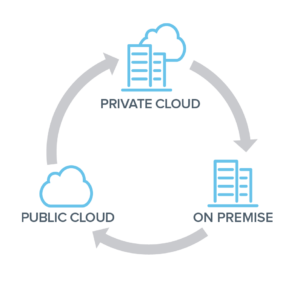
  A hybrid cloud environment integrates private, on-premise infrastructure with public cloud services, allowing data and applications to move between the two environments. This approach provides the flexibility to run workloads in the most appropriate location based on cost, performance, and security requirements.  

Benefits of a Hybrid Cloud Environment

1. Cost Savings
  • Optimized Resource Allocation: Utilize on-premise resources for steady-state workloads and high-cost operations like GPU-intensive tasks, while leveraging the cloud for variable workloads and peak demand.
  • Reduced Cloud Spending: Mitigate escalating cloud expenses by strategically deploying resources on-premise where it is more cost-effective.
  2. Scalability and Flexibility
  • Elastic Scaling: Seamlessly scale out to the cloud during peak times or for specific workloads that require additional resources.
  • Flexible Workload Management: Easily move workloads between on-premise and cloud environments based on current needs and cost considerations.
  3. Enhanced Control and Security
  • Data Sovereignty: Keep sensitive data on-premise to comply with regulatory requirements and enhance security.
  • Custom Security Measures: Implement tailored security measures on-premise while benefiting from robust cloud security for less sensitive data.
 

Implementing a Hybrid Cloud Environment: Key Considerations

1. Assess Workload Requirements Evaluate your applications to determine which workloads are best suited for on-premise infrastructure versus the cloud. Consider factors such as:
  • Resource Intensity: Identify CPU/GPU-intensive workloads that could incur high cloud costs.
  • Data Sensitivity: Determine which data sets require stringent security and compliance measures.
  Example: A financial services company might keep sensitive transaction processing on-premise while using the cloud for customer analytics and marketing campaigns.   2. Optimize On-Premise Infrastructure Invest in modernizing your on-premise infrastructure to ensure it can efficiently handle the workloads you plan to run locally. This includes:
  • Upgrading Hardware: Ensure you have the necessary compute, storage, and networking capabilities.
  • Implementing Virtualization: Use virtualization technologies to improve resource utilization and management.
  Example: A video rendering company could invest in high-performance GPUs and storage solutions on-premise to handle rendering tasks while utilizing the cloud for project management and collaboration tools.   3. Leverage Cloud Services Strategically Utilize cloud services for workloads that benefit most from the cloud's scalability and advanced features, such as:
  • Burst Capacity: Handle sudden spikes in demand without over-provisioning on-premise resources.
  • Advanced Analytics: Access cloud-based AI and machine learning services to analyze large data sets.
  Example: An e-commerce platform might use the cloud to handle traffic surges during holiday seasons and deploy AI-driven recommendation engines for personalized shopping experiences.    4. Implement Robust Management and Monitoring Tools Deploy tools that provide visibility and control over both on-premise and cloud environments. This ensures efficient resource utilization and cost management.
  • Unified Management Platforms: Use platforms like VMware Cloud Foundation or Microsoft Azure Arc to manage hybrid environments seamlessly.
  • Monitoring and Analytics: Implement monitoring tools to track performance, usage, and costs across both environments.
  Example: A manufacturing firm could use a unified management platform to monitor production workloads on-premise while tracking supply chain analytics in the cloud.   5. Ensure Seamless Integration and Interoperability Ensure that your on-premise and cloud environments can work together seamlessly. This involves: - Hybrid Cloud Architecture: Design your IT architecture to support hybrid deployments, including network connectivity and data integration. - APIs and Middleware: Use APIs and middleware solutions to facilitate communication between on-premise and cloud-based applications.   Example: A healthcare provider might integrate on-premise electronic health record (EHR) systems with cloud-based patient engagement platforms to provide a cohesive patient experience.  

Practical Examples of Hybrid Cloud Implementations

  1. Media and Entertainment Scenario: A film production company needs significant GPU resources for rendering but only during post-production phases.   Hybrid Solution: The company invests in high-performance GPU servers on-premise for rendering tasks while using the cloud for collaboration and file sharing among global teams.   2. Retail Scenario: An online retailer experiences high variability in web traffic, especially during sales events.   Hybrid Solution: The retailer runs the core e-commerce platform on-premise to ensure performance and cost predictability. During peak times, it scales out to the cloud to handle additional traffic and uses cloud-based AI services for customer insights and targeted marketing.   3. Healthcare Scenario: A hospital needs to maintain strict control over patient data but also wants to leverage cloud-based analytics for operational efficiency.   Hybrid Solution: The hospital keeps patient records and critical applications on-premise to comply with data protection regulations. It uses cloud services for non-sensitive data analytics, such as resource management and operational efficiencies.       Conclusion   A hybrid cloud environment offers the best of both worlds: the control and cost savings of on-premise infrastructure combined with the flexibility and scalability of cloud services. By carefully assessing workload requirements, optimizing on-premise resources, strategically leveraging cloud services, implementing robust management tools, and ensuring seamless integration, businesses can achieve a balanced, efficient, and cost-effective IT strategy.   Embracing a hybrid cloud approach allows businesses to adapt to changing demands, manage costs effectively, and maintain control over critical data and applications. As cloud technology continues to evolve, the hybrid model provides a pragmatic and forward-thinking solution to the complexities of modern business IT needs.
Read More
Affordable Cybersecurity Solutions for Small Businesses: Protecting Against Cyber Threats on a Budget
Information Security

Affordable Cybersecurity Solutions for Small Businesses: Protecting Against Cyber Threats on a Budget

Introduction:

In today's digital landscape, small businesses are increasingly becoming targets of cyber threats such as malware, viruses, worms, and ransomware. While the cost of high-end cybersecurity solutions like CheckPoint Firewall and Sophos Endpoints may be prohibitive for small businesses with limited budgets, there are several affordable and even open-source alternatives available. In this comprehensive guide, we'll explore low-cost and open-source cybersecurity solutions that small businesses can leverage to protect themselves against cyber threats without breaking the bank.             Archsolution Limited  

1. Understanding the Cyber Threat Landscape for Small Businesses:

  1.1.  Rising Cybersecurity Threats:
  • Small businesses are increasingly targeted by cybercriminals due to their perceived vulnerability and lack of robust cybersecurity measures.
  • Cyber threats such as phishing attacks, malware infections, and ransomware can cause significant financial losses, data breaches, and reputational damage to small businesses.
  1.2.  Importance of Cybersecurity for Small Businesses:
  • Cybersecurity is critical for small businesses to safeguard sensitive data, maintain customer trust, and ensure business continuity.
  • Investing in cost-effective cybersecurity solutions is essential for small businesses to mitigate risks and protect against cyber threats effectively.
 

2. Affordable Cybersecurity Solutions for Small Businesses:

  2.1.  Open-Source Firewall Solutions:
  • Open-source firewall solutions such as pfSense and OPNsense offer robust firewall capabilities at no cost.
  • These firewall platforms provide features such as network traffic monitoring, intrusion detection, and VPN support, allowing small businesses to secure their network perimeter effectively.
  2.2. Endpoint Protection Software:
  • Instead of expensive endpoint protection suites, small businesses can opt for free or low-cost antivirus software such as Avast, AVG, or Bitdefender.
  • These antivirus solutions offer basic malware detection and removal capabilities, protecting endpoints from common cyber threats without the hefty price tag.
  2.3 Security Awareness Training:
  • Educating employees about cybersecurity best practices is essential for small businesses to prevent social engineering attacks and phishing scams.
  • Free resources such as the Cybersecurity Awareness Training provided by the Cybersecurity and Infrastructure Security Agency (CISA) can help small businesses train their workforce on identifying and responding to cyber threats effectively.
  2.4. Open-Source Security Tools:
  • Small businesses can leverage open-source security tools such as Snort for network intrusion detection, Wireshark for packet analysis, and OpenVAS for vulnerability scanning.
  • These free security tools offer advanced capabilities for threat detection, analysis, and remediation, helping small businesses enhance their cybersecurity posture without incurring additional costs.
 

3. Best Practices for Implementing Affordable Cybersecurity Measures:

  3.1.  Conduct Risk Assessments:
  • Small businesses should conduct regular risk assessments to identify potential cybersecurity threats and vulnerabilities.
  • By understanding their risk profile, small businesses can prioritize cybersecurity investments and allocate resources effectively to address the most critical areas of concern.
  3.2. Implement Multi-Layered Security:
  • Instead of relying on a single security solution, small businesses should adopt a multi-layered approach to cybersecurity.
  • Combining firewall protection, endpoint security, email filtering, and security awareness training can create multiple barriers against cyber threats, reducing the likelihood of successful attacks.
  3.3. Keep Software and Systems Updated:
  • Regularly updating software applications, operating systems, and security patches is essential for small businesses to mitigate security vulnerabilities.
  • By staying current with software updates and patches, small businesses can close known security loopholes and protect against emerging threats effectively.
  3.4. Backup Data Regularly:
  • Implementing regular data backups is critical for small businesses to mitigate the impact of ransomware attacks and data breaches.
  • Small businesses should store backups securely and test restoration procedures periodically to ensure data integrity and availability in the event of a cyber incident.
 

Conclusion:

Cybersecurity is a pressing concern for small businesses facing an increasingly hostile threat landscape. While high-end cybersecurity solutions may be out of reach for small businesses with limited budgets, there are several affordable and open-source alternatives available. By leveraging cost-effective cybersecurity solutions, implementing best practices, and fostering a culture of cybersecurity awareness, small businesses can effectively protect themselves against cyber threats and safeguard their operations, customers, and reputation in today's digital world.  
Read More