
Cloud is Never a Perfect or Single Answer: Why Hybrid Strategies Make Sense
Introduction
In recent years, cloud computing has been marketed as the ultimate solution for IT infrastructure. Companies have been encouraged to move everything to the cloud, citing benefits like scalability, ease of management, and high availability. However, the reality is that cloud services come with significant costs, especially when dealing with database services, data analytics, AI/ML (GPU-based workloads), and data-intensive manipulations.
While cloud providers offer convenience and operational agility, they are not always the most cost-effective option. In many scenarios, on-premises infrastructure remains a better choice, particularly for resource-intensive applications. The ideal approach is often a hybrid model that leverages both cloud and on-premises solutions to balance cost, performance, and maintenance efforts.
In this article, we will explore when cloud services make sense, when on-premises hosting is a better option, and how businesses can implement an effective hybrid strategy.
Understanding the True Cost of Cloud Computing
Cloud computing seems appealing due to its pay-as-you-go pricing model, which allows organizations to scale their infrastructure dynamically. However, certain hidden costs must be considered:
- Data Transfer Costs: Moving large datasets in and out of the cloud can be expensive.
- Storage Costs: While cloud storage appears affordable, long-term costs add up, especially for high-performance databases.
- Compute Costs: Cloud instances optimized for high-performance computing (HPC), AI/ML workloads, or analytics can be significantly more expensive than running the same workloads on on-premises hardware.
- Vendor Lock-In: Many cloud services are proprietary, making migration difficult and costly if businesses wish to switch providers.
When Cloud is the Best Fit
Despite the cost concerns, cloud computing offers several advantages that make it a great fit for specific workloads:
1. Elastic Workloads with Unpredictable Demand
- Best suited for: E-commerce platforms, seasonal applications, and streaming services.
- Cloud allows businesses to scale up resources during peak demand and scale down when demand decreases, optimizing cost efficiency.
2. Disaster Recovery and Business Continuity
- Best suited for: Backup storage, failover systems, and rapid recovery solutions.
- Cloud providers offer multi-region redundancy, allowing businesses to recover quickly from failures.
3. Software-as-a-Service (SaaS) and Managed Services
- Best suited for: CRM (Salesforce), Email (Google Workspace, Microsoft 365), Collaboration (Slack, Teams).
- Cloud services eliminate the need for maintenance and ensure users always have access to the latest software versions.
4. Multi-Region or Global Applications
- Best suited for: Content delivery networks (CDNs), global SaaS applications, and video streaming services.
- Cloud providers have data centers worldwide, allowing organizations to serve customers globally with minimal latency.
5. AI and Machine Learning Experimentation
- Best suited for: Startups and research teams running occasional AI training.
- When GPU resources are required occasionally, cloud-based AI services (like AWS SageMaker or Google Vertex AI) offer flexibility without upfront investment in expensive hardware.
When On-Premises is the Best Fit
For some workloads, maintaining on-premises infrastructure is the superior option due to performance, cost savings, and security considerations.
1. Resource-Intensive Database and Data Analytics
- Best suited for: OLAP databases, data warehouses, and ETL pipelines.
- Cloud database services (e.g., AWS RDS, Google BigQuery) charge based on queries, storage, and compute time, making costs unpredictable.
- On-premises servers can provide significantly lower costs for always-on databases with high query volume.
2. High-Performance AI/ML Training (GPU Workloads)
- Best suited for: AI startups, financial modeling, and computer vision applications.
- Cloud GPU instances (e.g., AWS EC2 P4, Azure NC-series) can cost thousands of dollars per month.
- Purchasing on-premises NVIDIA A100, H100, or RTX 4090 GPUs can pay off within a year for businesses running continuous AI workloads.
3. Compliance and Data Security
- Best suited for: Healthcare, banking, and government agencies.
- Some regulations require strict data sovereignty (e.g., GDPR, HIPAA, PCI DSS), making cloud services unsuitable for storing sensitive information.
4. Fixed Workloads with Predictable Demand
- Best suited for: Enterprise applications (ERP, CRM) and internal business systems.
- If the workload is stable and predictable, owning infrastructure can be cheaper in the long run.
5. Edge Computing and Low-Latency Applications
- Best suited for: Manufacturing automation, IoT, and telecom.
- Edge devices and on-prem servers allow real-time data processing with ultra-low latency, eliminating dependency on cloud latency.
Implementing a Hybrid Cloud Strategy
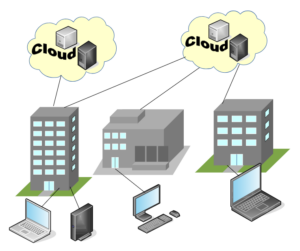
Rather than choosing exclusively between cloud or on-premises, organizations can implement a hybrid cloud strategy to balance cost and performance.
Best Practices for a Hybrid Approach
1. Classify Workloads
- Determine which workloads are cloud-optimized and which should remain on-premises.
- Example: Keep AI model training on-prem, but use cloud for inference deployment.
2. Use Cloud for Burst Capacity
- Example: An e-commerce company can keep its core services on-prem but scale to cloud during peak sales events.
3. Implement Cloud-Based Backups for On-Prem Infrastructure
- Store offsite backups in AWS S3, Azure Blob, or Google Cloud Storage to protect against local hardware failures.
4. Optimize Costs with Reserved Instances and Spot Pricing
- Example: Instead of using on-demand cloud instances, businesses can reserve cloud resources at discounted rates or use spot instances for temporary workloads.
5. Leverage Containerization and Orchestration
- Docker and Kubernetes allow workloads to move seamlessly between cloud and on-premises, increasing flexibility.
Tools for Managing Hybrid Cloud
To manage a hybrid cloud strategy effectively, organizations can use:
- VMware vSphere: For on-prem virtualization with cloud integration.
- Proxmox VE: A free and powerful alternative for hybrid virtualization.
- Kubernetes (K8s): Container orchestration across cloud and on-prem.
- HashiCorp Terraform: Infrastructure as Code (IaC) for hybrid environments.
- AWS Outposts / Azure Stack / Google Anthos: Extending cloud services into on-premises data centers.
Conclusion: The Future is Hybrid
Cloud computing is not a one-size-fits-all solution. While it provides scalability and agility, it can become expensive and inefficient for resource-heavy workloads like databases, AI/ML, and analytics. On the other hand, on-premises infrastructure offers cost savings, better performance, and security control but lacks elasticity.
The best strategy is a hybrid cloud model, allowing organizations to optimize costs, maintain compliance, and balance performance. By classifying workloads and leveraging modern hybrid management tools, businesses can build a scalable, cost-effective, and resilient IT infrastructure for the future.